275 stories
·
1 follower

Hide your slop PR descriptions behind

1 Share

Most of the changes I make to my projects these days come in the form of PRs opened for me by Claude Code or Codex. The PR is my unit of work - I use them to bundle commits together, iterating on them until a feature is complete, document decisions and then merge the finished result. Today's coding agents are great at writing PR descriptions.

They're too good at describing the work

The problem is that they are too good. An agent-written PR description is accurate and comprehensive. It describes the problem, the detailed solution, and the steps taken to verify it. That's a lot of information to absorb.

It's not necessarily slop, but it reads like slop!

It's very easy to spot an AI-written PR, and as with other forms of AI writing my instant reaction is best summarized as "I'm not reading all of that". It doesn't matter how accurate or useful the information is, I'm instantly put off by the thought that it will take me longer to read than it took the driving author to write... even when that driving author is me!

I want human editorial judgement. I want someone to have thought just long enough about the PR to give me a human-approved introduction that helps me understand, at a high level, what the PR is for and whether it deserves more of my attention.

I think I've found a low-effort way to do this that feels right.

Hide most of it in a details/summary

The HTML <details><summary> elements render as a collapsed heading (the summary) that can be expanded to view the larger piece of text. The code looks like this:

<details>
  <summary>Claude Opus 5.5</summary>
  <h2>The hook</h2>
  Plugins implement <code>register_agent_reference_types(datasette)</code>...
</details>

When rendered, it looks like this:
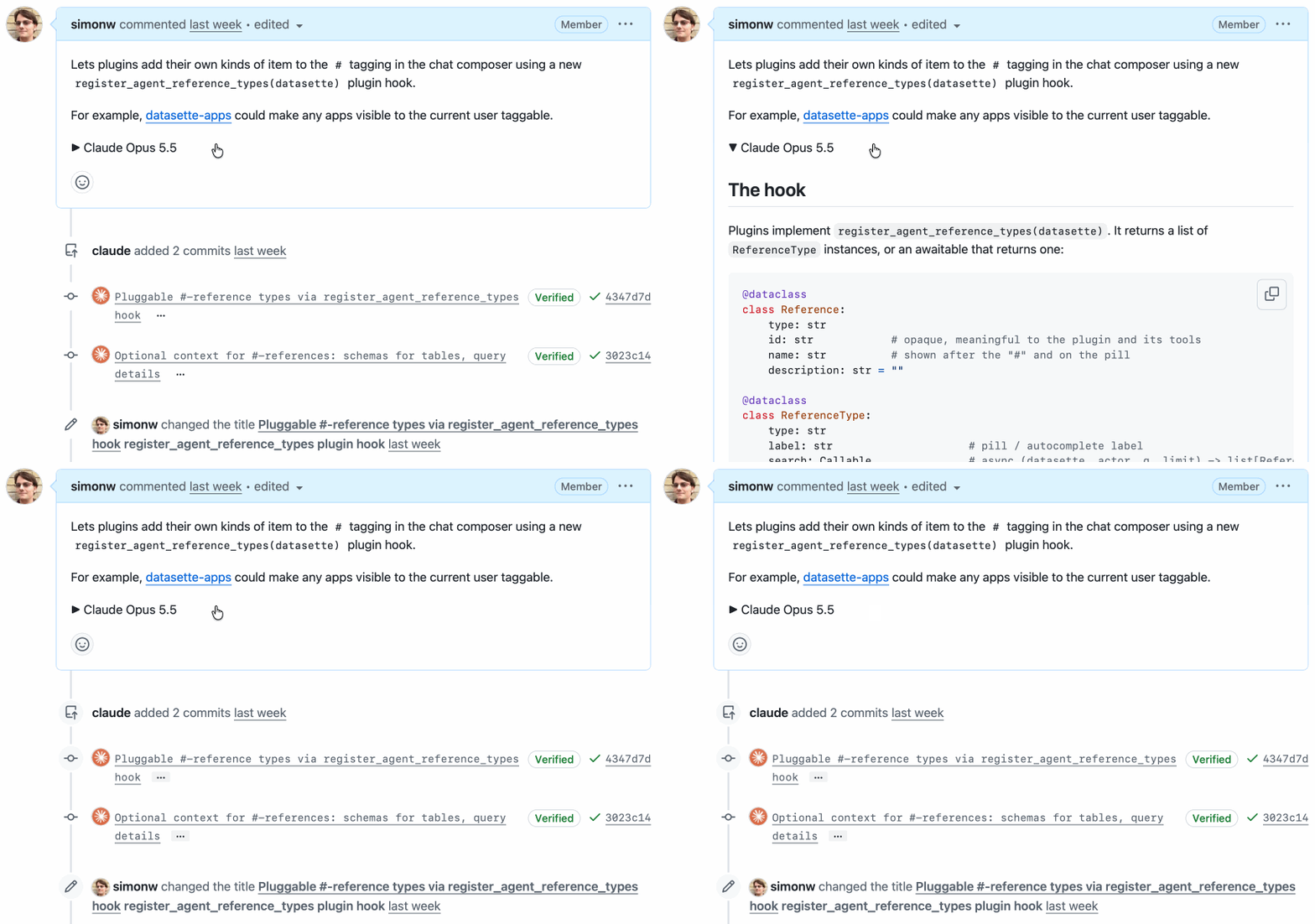
Screenshot of a GitHub PR. The text "Claude Opus 5.5" sits next to a little black arrow. Clicking on that text expands a full description inside the PR body.

Crucially, <details><summary> is supported in GitHub Markdown. You can drop those tags directly into an issue comment or PR description and GitHub will hide the details and display just the summary plus an expansion arrow.

I've started using this for my AI-generated pull requests.

The opening paragraph of my PRs will be carefully selected to act as a high-level explanation of what's going on - the shortest text a human can read that will help get them up to speed.

I'll sometimes throw in a screenshot as well, since images are often the best way to quickly illustrate a new feature.

The full agent-written essay then follows in a <details><summary>. I use the model name and often the effort level as that summary, to make it abundantly clear what is going on - "Claude Opus 5.5 Medium" for example.

My PRs don't feel nearly as sloppy now! The information is all still there, but a reader can glance at it and get the top, human-curated information without their eyes glazing over at multiple paragraphs of agent-written details.

I don't always write the introduction myself - sometimes the agent has given me what I need already, hidden away in the avalanche of other text. My promise to the reader is that the short opener will represent my human judgement as to what is definitely worth their time.

Here are some recent examples where I've used this pattern, including the opener I used:

The mnemonic

I used to have trouble remembering the order of the tags - is it <details><summary> or <summary><details>?

Here are two tricks that helped me.

First, and most obviously, the <summary> is clearly the bit where you summarize the details. That's the tag for your line of text that can be clicked to expand - the <details> element must then wrap everything else.

An even better trick is to always refer to these two tags as "details-summary".

"details-summary" is two syllables followed by three syllables. That rolls off the tongue more smoothly than the three-two punch of "summary-details".

Say "details-summary" out loud just a few times and you'll never forget the order of the tags again.

(I still wish GitHub would add a button to their Markdown editor for this - partly to save me painstakingly typing it on my mobile keyboard, and partly to help spread the word to more GitHub users that this feature exists.)

Tags: github, html, markdown, ai, datasette, generative-ai, llms, ai-assisted-programming, llm, coding-agents

Read the whole story
jhunorss
15 hours ago
reply
Share this story
Delete

Humble Bundle vibe-code update breaks all user security

1 Share

Humble Bundle sells cheap deal packages of video games, and now books and stuff. The money often goes to a charity. It’s a nice way to really grow your Steam guilt pile. The bundles are very popular. People like Humble Bundle and think well of it.

Until now. Humble Bundle had a website update on Thursday. Reddit users first noticed the update removed two-factor authentication from the website. Which is worrying for a shop that stores payment credentials. [Reddit, archive]

Humble Bundle added back sending a code to your email to log in. When you enter the code, it might not work.

You can change your password without entering your old one — or someone else could change your password. [Kotaku]

For a while, you didn’t even get an email for changes to account details.

If you change your email, it sends a verification to the new address, not the old one.

Basic functions don’t work. You try to buy something and it just shows internal errors. The localisation is bad machine translation. The site frequently crashes on mobile. [Bluesky]

Your library now doesn’t show half your stuff. For what it does show, you can see five entries at a time — too bad if you’ve got a lot of stuff. You can’t tell redeemed game keys from unredeemed keys. And redeeming keys often just fails. [Reddit, archive]

Humble Bundle is owned by ZDNet. They fired most of the staff in June. There are only two engineers left for the whole site. The company is leaning on contractors and — of course — AI. [Aftermath]

ZDNet have not admitted this was a vibe update. But it’s the most obvious vibe update. It has the styling of when you ask Claude to generate a site for you. And nothing works.

Nobody understands why anyone thought pushing a broken and untested site like this was a good idea. It’s like management read how AI could replace all those uppity engineers who push back on management brain farts, and they believed it, and they pressed the magic Claude button. And they just pushed the result to production.

If you’ve got an account on Humble Bundle, log in now and remove any payment info.

A lot of people are deleting their account entirely. Or they’re trying to — the vibe update broke account removal as well, and the support queue is apparently running at one week. But you can go to the ZDNet privacy portal — that apparently works. Sometimes. [ZDNet]

There are other bundle sites. I expect a new favourite to emerge. But Humble Bundle is out.

Read the whole story
jhunorss
15 hours ago
reply
Share this story
Delete

Ed Catmull talks to Higgsfield AI

1 Share

Recently CGI industry veteran and pioneer Ed Catmull sat down with Higgsfield AI (a provider of generative AI services whose website looks like it was designed by ChatGPT version 1) to explain why he doesn’t fear AI. It’s worth listening to carefully because it is very nuanced and you need to be sharp to pick up how many caveats were peppered in this responses.

Like anyone who is worth their salt, CGI industry veteran and pioneer Ed Catmull does not fear AI because he understands the limitations. Those limitations are not only technical but also parasocial, something that I have often mentioned on my blog for several years. People who understand business and not just tech will always speak about the consumer experience side, not just production technologies.

That's why older people in the creative field aren't fearful of AI compared to the younger generation. They have the experience to know what works and what doesn't work creatively, technically, socially and financially. They are also less likely to be living on social media and being manipulated by hype, fear and misinformation.

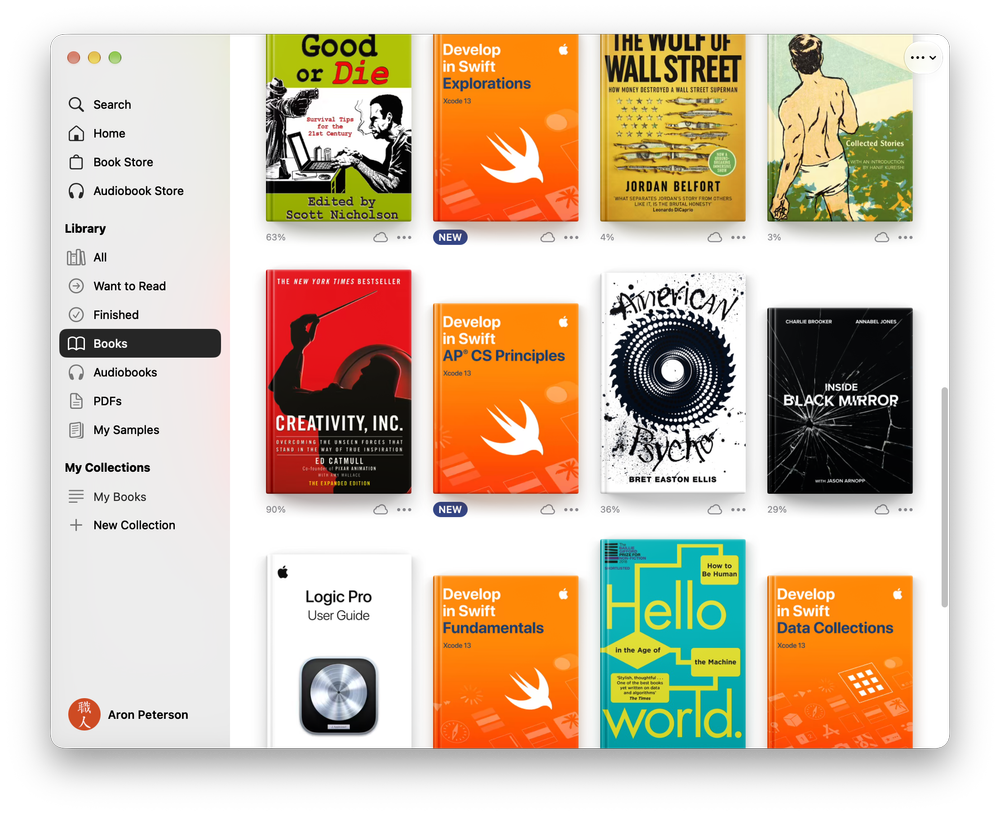
The first ebook I ever bought was written by Ed Catmull. Creativity Inc is well worth reading no matter which sector you work in or what your hobbies are.

A screenshot from the Apple Books library.

Read the whole story
jhunorss
15 hours ago
reply
Share this story
Delete

The AI-Assisted Linux Driver for DisplayLink Gets Legal Notice

1 Share
synaptics vino legal notice-themed banner

Before we dive into the matter, you first have to understand what DisplayLink is. It is a proprietary graphics transport technology that lets computers connect to one or more external displays over USB, using docks or adapters built around DisplayLink chips.

It works by compressing display data on the host computer and sending it to a chip in the connected device. The chip then decodes it for output to monitors through interfaces such as HDMI or DisplayPort.

On Linux, this support can rub some people the wrong way due to its closed-source nature. That is where Mike Lothian's (FireBurn) Vino comes in as an open alternative.

Unfortunately, Synaptics owns DisplayLink and has sent Mike cease-and-desist letters alleging that he infringed its DisplayLink patents with his project.

What's Vino?

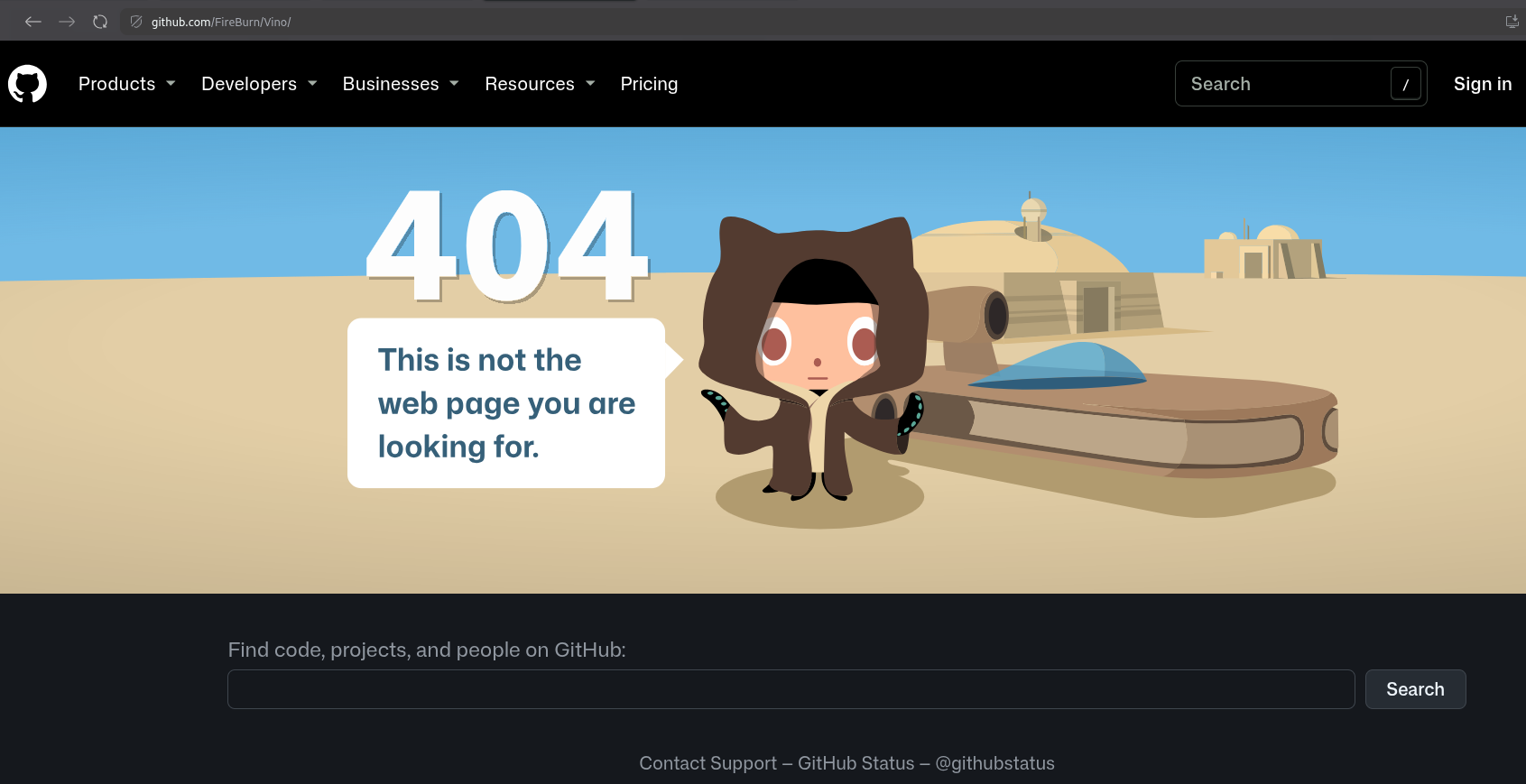
vino github repo error 404

Vino is a driver that lets the Linux kernel talk to DisplayLink docks directly. It is meant to replace DisplayLink's closed-source software and the open source EVDI kernel module that sits beside it.

Mike wrote it with help from Claude Code, and the first version reached the kernel mailing list in June, unfinished. He had faced a communication issue between the dock and the driver and asked other developers for help.

In early July (courtesy of LWN.net), he emailed a Synaptics employee for guidance and mentioned his Rust rewrite of EVDI. About two weeks later, a different employee replied.

That reply said his Rust rewrite of EVDI was not a thing of concern. Rather, the concern was the DisplayLink protocol and codec, which Synaptics believes are covered by its patents.

Lawyers get involved

A cease-and-desist letter followed on August 17. It told Mike to stop development and withdraw anything he had submitted to maintainers and hosting sites, with a signed confirmation due by August 28.

An appendix listed over 125 patents without saying which applied. Mike posted a working version 3 of Vino on August 26 and asked Synaptics the next day which claims they had in mind.

The answer came in October as claim charts. They map one claim from each of two patents, GB2484736 and GB2485613, to his source code.

The October 5 letter said Synaptics would seek $25,000 for the cost of preparing those charts if Mike missed an October 11 deadline, with the figure rising by at least $25,000 each week.

Mike replied on October 6 (message 8) with an offer to pause public work on the encoding code the charts point to if Synaptics paused the deadline and the weekly charge. He also asked about licensing that code for non-commercial use.

On October 7, Synaptics said it would grant no patent license or promise not to sue and set October 18 as a final deadline.

💭
What I can see so far is a very aggressive patent infringement witch hunt against a lone open source developer who was quite open to communication.

Synaptics took about three weeks to answer his request for specifics, then followed with a potentially life-ruining $25,000 demand that compounds weekly.

Clean room design quirks

Mike describes Vino as a clean-room driver and says he reverse engineered it from captured USB traffic and vendor programs.

If you didn't know, in a clean-room recreation, one party studies the original implementation, then writes a description, and a separate party builds the new code from that description alone.

It is meant to act as a defense against copyright claims because it shows nothing was copied. Synaptics’ July reply argues that clean-room or independently written code can still infringe a patent. 🤷

The timing

Vino also lands in a busy stretch for AI-assisted reverse engineering, from smart TV cleanups to office suite clones. Legal pressure has reached other AI-built projects too.

Mike has already taken down the Vino repository in response to the demands, and Synaptics has not made a public statement so far.

Only time will tell what happens to the work, and I hope someone forked it before it went offline, as that would give others a good starting point to build on.

Read the whole story
jhunorss
1 day ago
reply
Share this story
Delete

I Tried The Weird New Mini Window Feature in Firefox 160

1 Share
firefox mini window banner

Mozilla has been experimenting a lot with Firefox lately, and a good chunk of that effort has gone into AI. The sidebar can house a chatbot of your choice, and Smart Window has an assistant that lets you pick the AI model.

Luckily, they have stopped tunnel-visioning into AI, and the UX side of the browser has seen some big upgrades.

Containers keep work, shopping, and personal browsing separate; Split View shows two pages side by side in one window; and Vertical Tabs move your tab list into the sidebar.

I believe that these upgrades have made Firefox a much more compelling option when compared to other popular web browsers.

Of course they are not stopping there. Mini Window is the latest addition to that list, which builds on the work done in Picture-in-Picture, the floating video player.

🚧
This feature is still being developed. Don't rely on it for any important browsing sessions.

Firefox Mini Window

Using Mini Window on Linux with Firefox 160 feels like a beta from the start. It needs a regular browser window with a tab open to work because a standalone mini window is not possible yet.

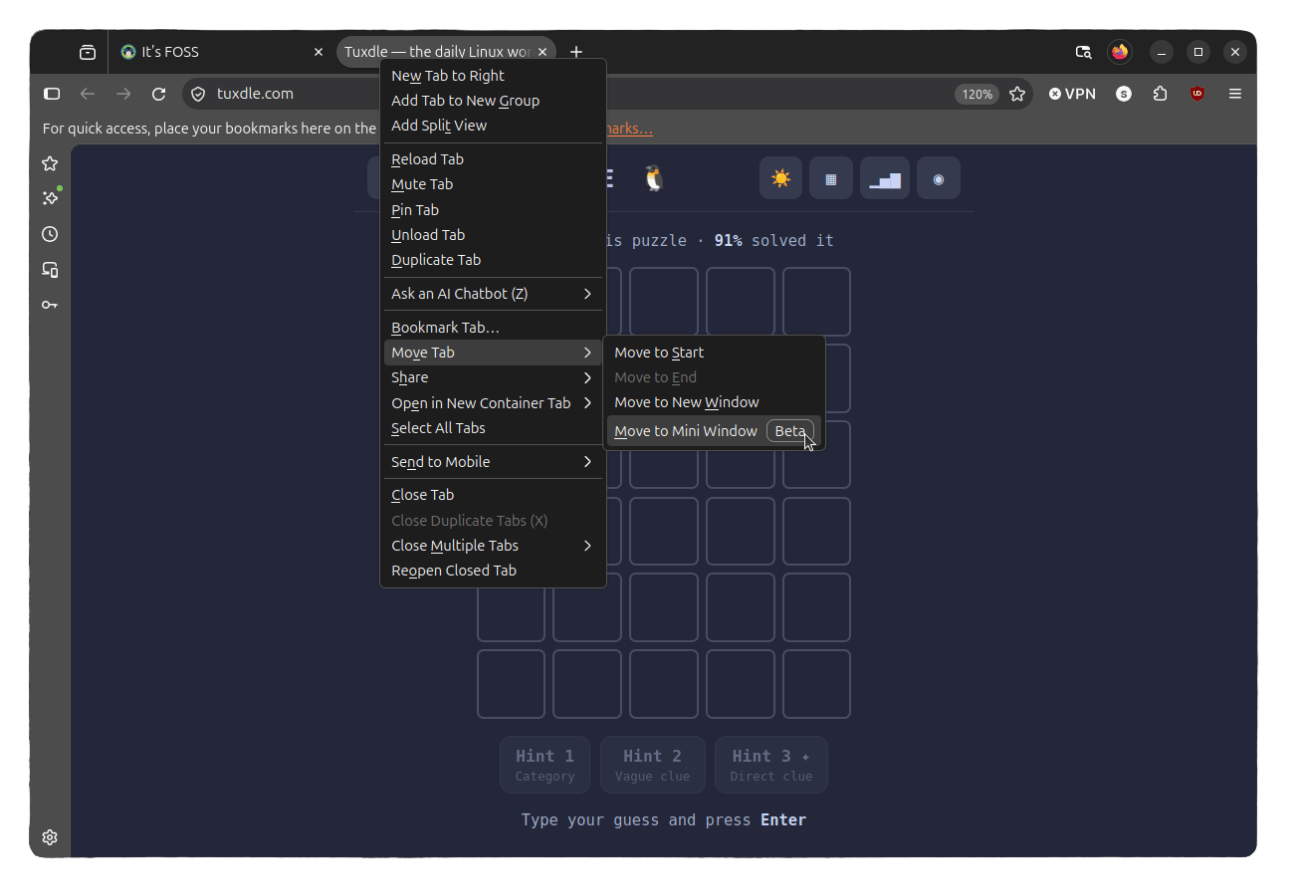
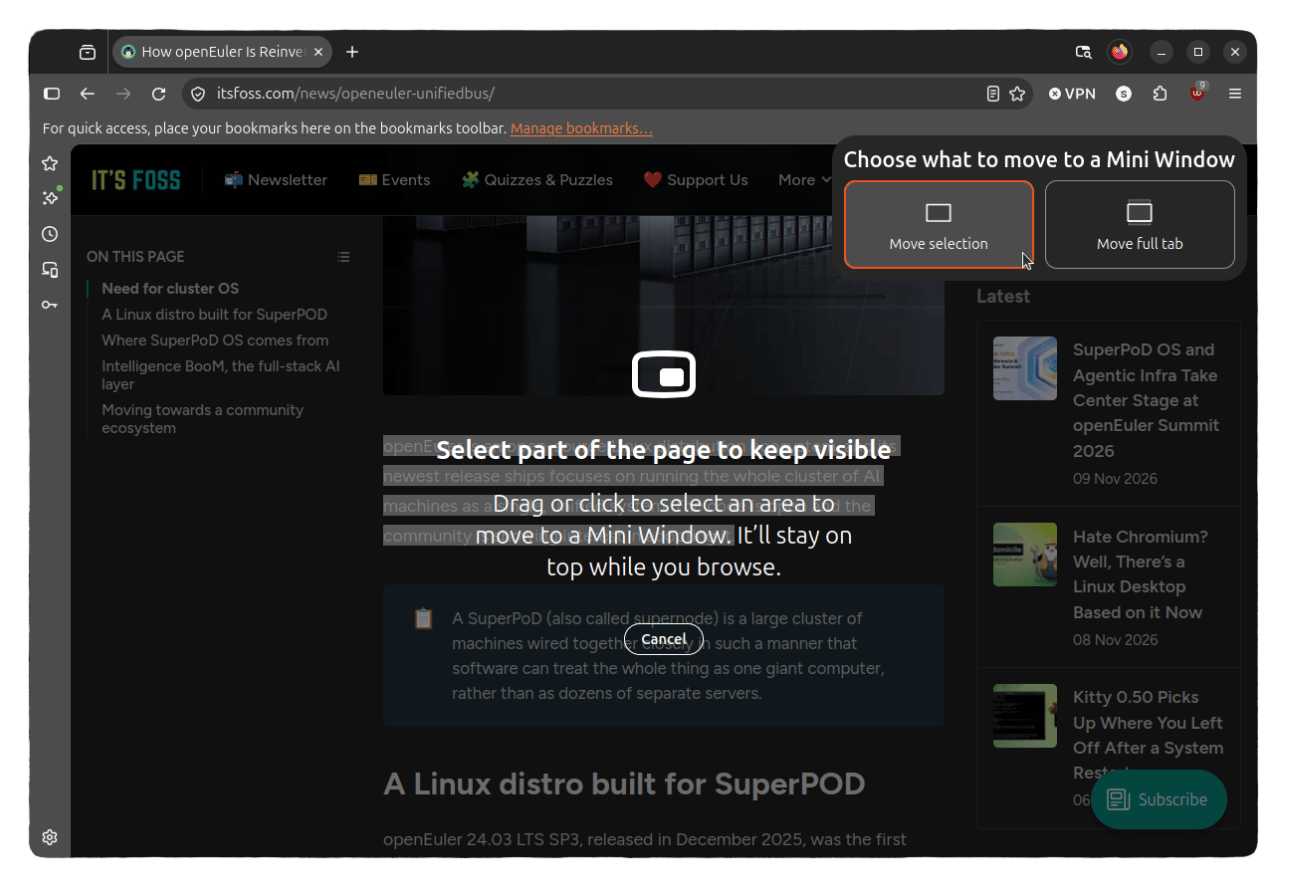
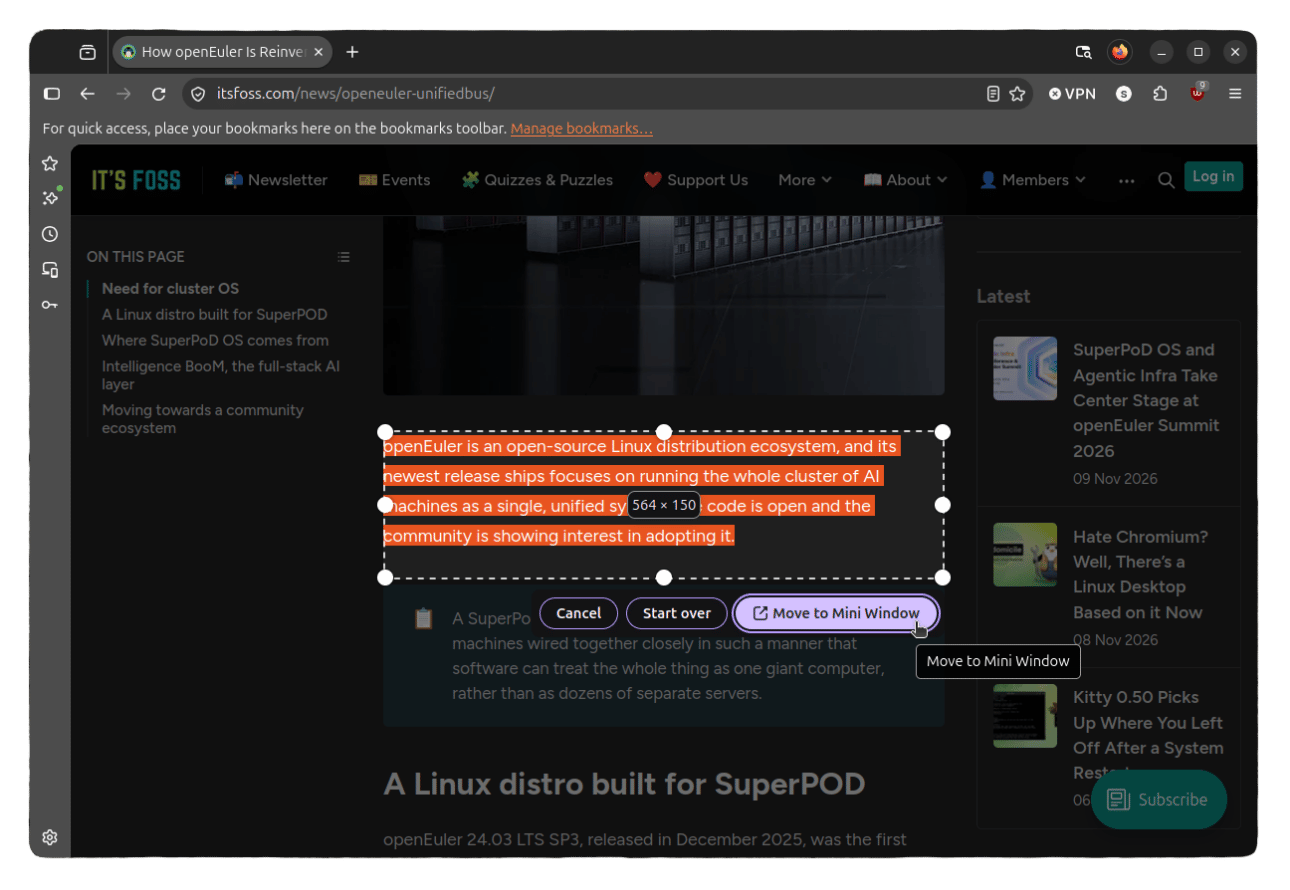
It comes in two modes. Move full tab sends the whole page into a small window that floats above your other windows, and Move selection lets you draw a box around the part of a page you want and sends only that.

Either way, the moved tab is not available in the main window until you send it back.

A full tab mini window looks like a tiny browser window. The top bar has the page address along with reload, back, forward, send back, and close buttons. Pages adapt to the smaller size as well.

During testing, websites like ours, Wikipedia, and Associated Press were successfully switching to their compact layout.

A selection mini window is more compact and shows just the chosen area under the page address, with a reload button and the same close and send back buttons.

Both kinds can be dragged around and resized. Selection mini windows have some rough edges because they can appear too small and refuse to resize well.

They are still handy for research sessions where you need to check small bits of information without opening more tabs and cluttering the desktop.

Try it Out

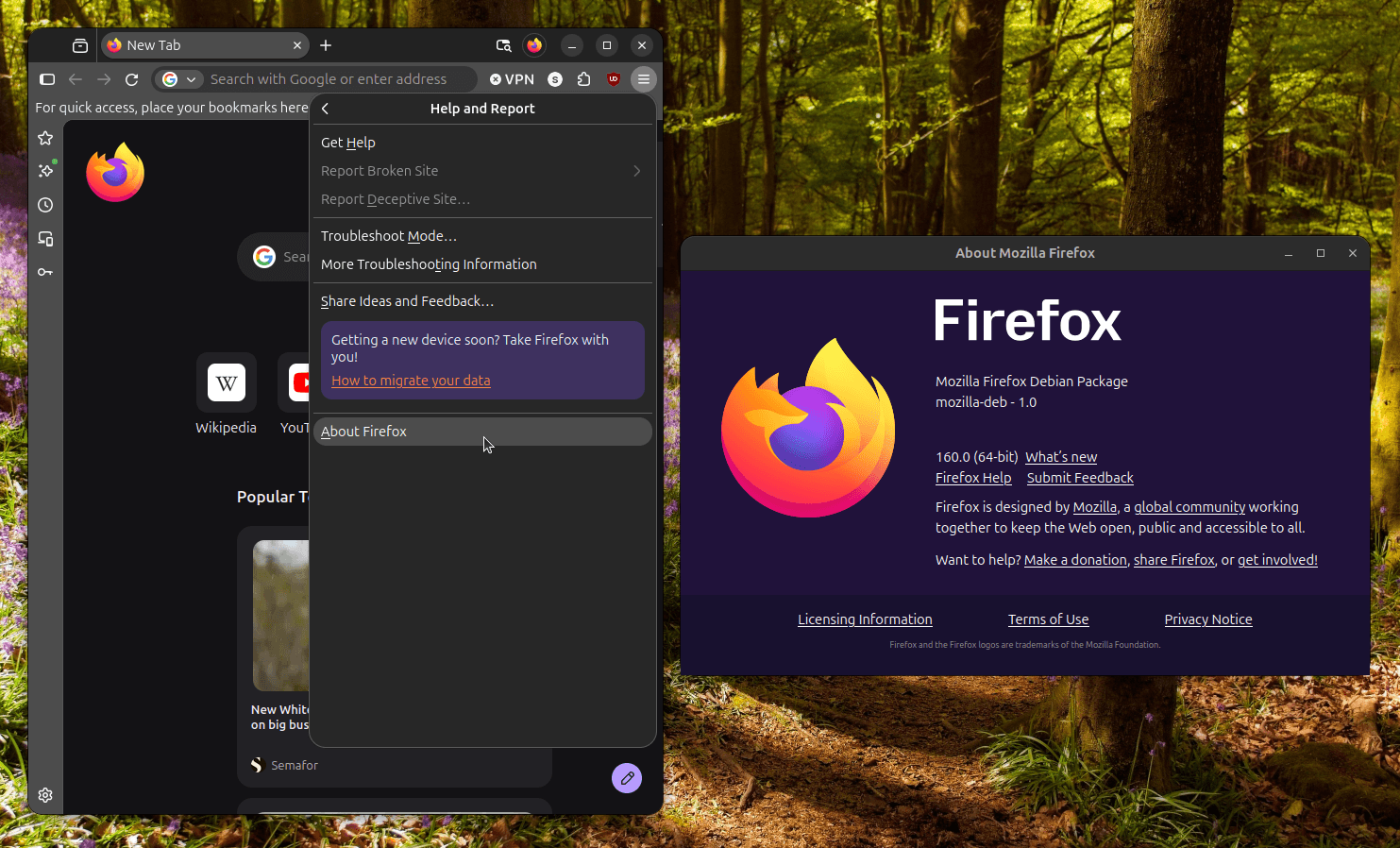
firefox about page

Before you get started using Mini Window, you first have to ensure that you are on Firefox 160 or later. To do that, go into the hamburger menu and open "Help and Report." Here, click on "About Firefox" and take note of the version shown in the dialog that opens up.

If you find that an older build of Firefox is installed, then get the latest release from the official website or the official FTP mirror.

Next, you just have to start a normal browsing session with multiple tabs and follow any one of these three approaches to get started:

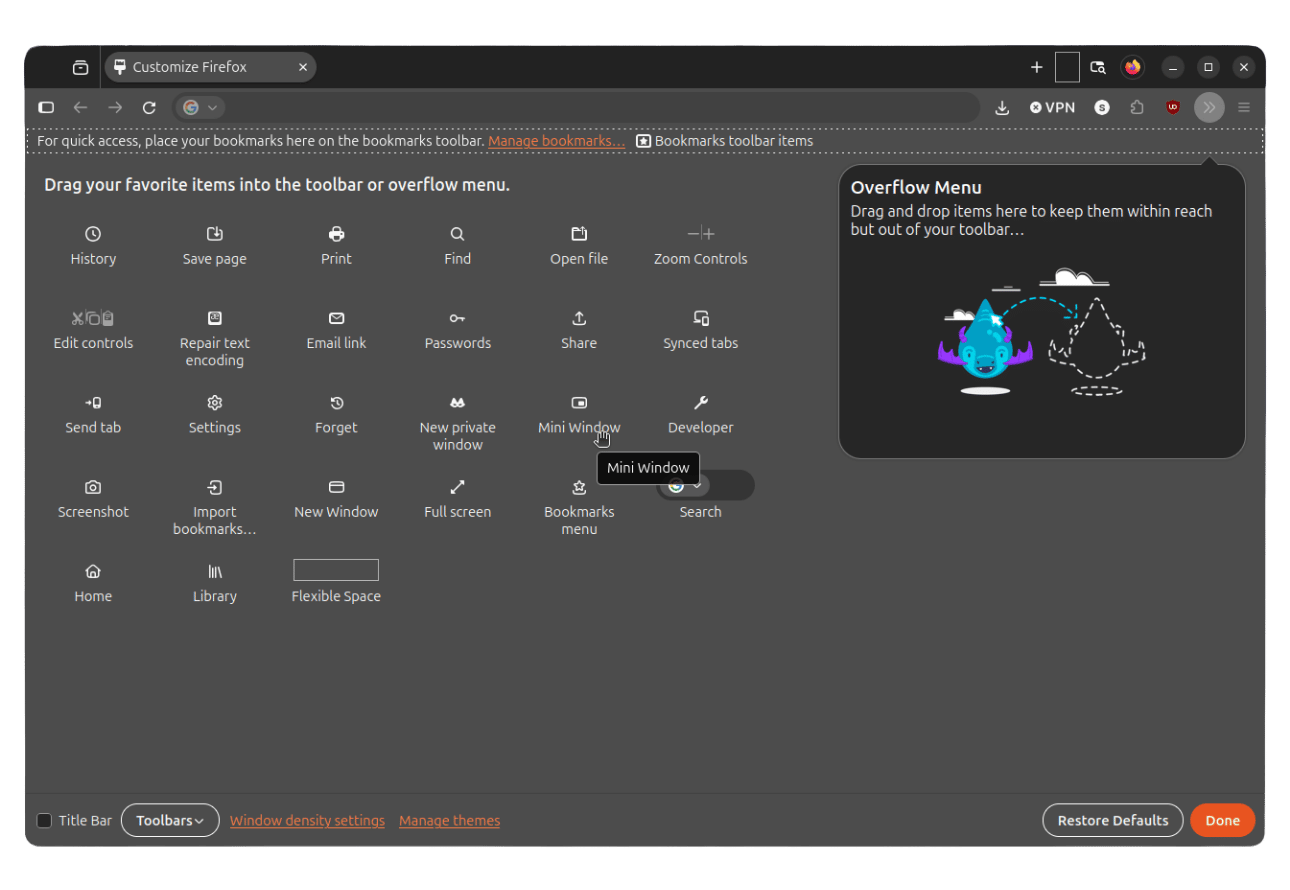
  • Add the Mini Window icon to the toolbar.
  • Right-click a tab and go into "Move Tab."
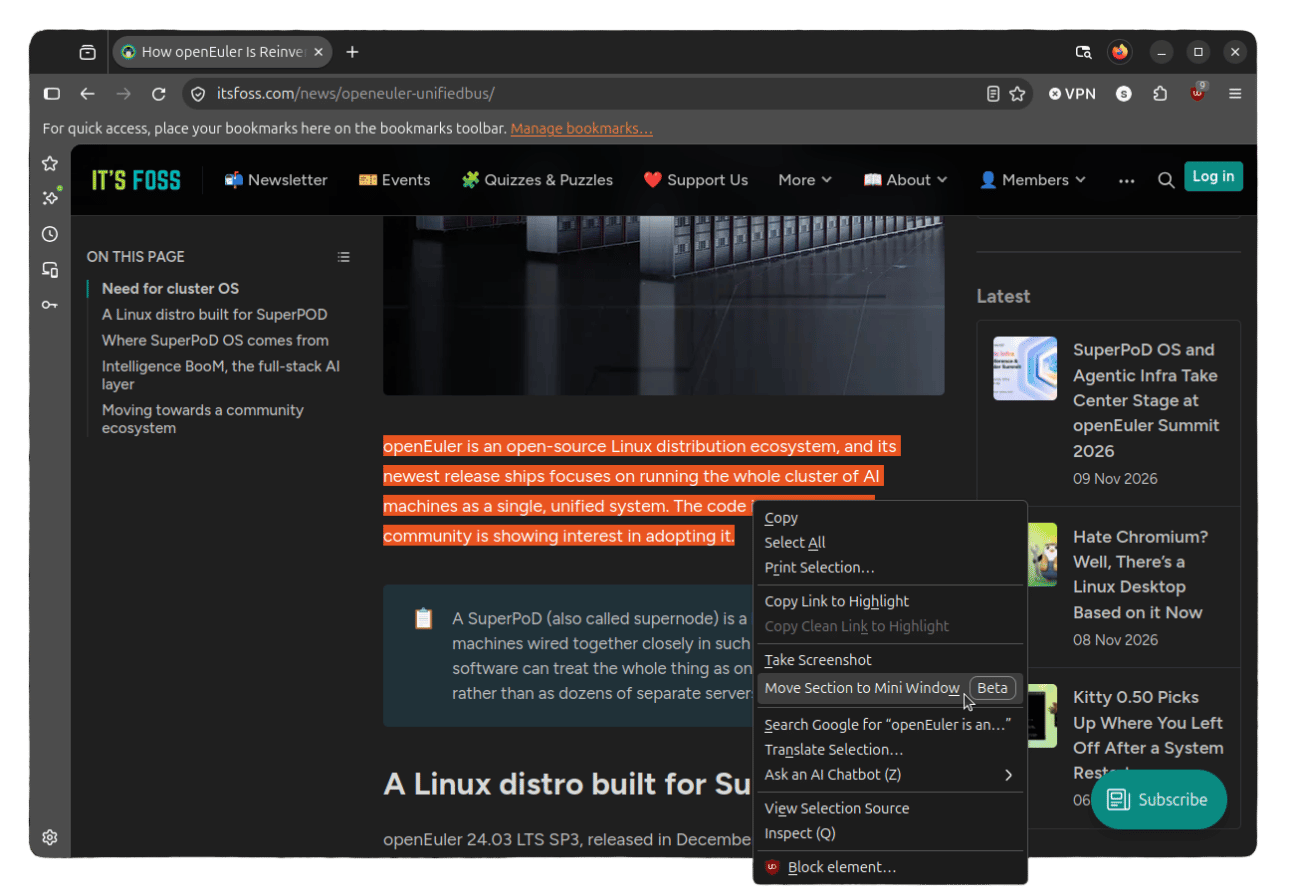
  • Right-click the page content and choose Move Section to "Mini Window."

For the toolbar method, right-click the toolbar and open "Customize Toolbar." Find the Mini Window icon in the list and drag it onto the toolbar, then hit "Done." After that, the feature is just one click away on any page.


Suggested Read 📖: Firefox can do a lot more than you realize. Here are 21 features most people overlook.

Read the whole story
jhunorss
1 day ago
reply
Share this story
Delete

Tech stocks crash — and so do data center loans

1 Share

The AI market works on bubble economics. It’s about stories and magic! Making financial sense, that’s for the old people now! Get with the program, granddad!

But magic doesn’t happen. And it never happens with money.

We know you all just want this thing to crash. Every time the Nasdaq hiccups, will this pass in a few days? Or … is this it?

After the Democrats swept the US elections on Tuesday, the market went up a bit on Wednesday. But on Thursday stocks crashed hard, with big losses in the S&P, Dow, and Nasdaq. Large holders were dumping their tech stocks specifically — anything that touched AI. [Bloomberg, archive]

There was some recovery this morning, after a good jobs report — and some traders deciding this wasn’t the big one and they could buy the dip. Cross fingers.

The finance papers blame the crash on the threat that the incoming Democrats might regulate AI in any manner whatsoever and pull back on data center builds. Oh no! [FT, archive]

One US portfolio manager called the Democrat win “a horrible day for America.” He happens to hold a lot of Anthropic. [FT, archive]

But the political pushback was coming. Data centers were the issue in the election. The AI and crypto lobby groups — who are largely the same actual guys — blew almost all the $250 million they poured in. [Molly White]

Banks and financiers don’t think data center loans are such a great bet anymore. CoreWeave bonds have now topped 16% yield. CoreWeave raised debt earlier in 2026 at 9%. You can’t build new data centers on 16% interest. [CNBC]

Goldman Sachs and Apollo led SpaceX’s recent $40 billion bond offer to send Nvidia chips to space — and now they’re frantically trying to sell the debt off earlier than planned. This deal was written so SpaceX could not claim force majeure to pause payments — the way Oracle did in September. [Bloomberg]

Rumors were circulating on Thursday that someone was dumping $500 million of data center loans. That turned out to be Dutch bank ING, which has put the loans up for auction — including a $25 million slice of OpenAI’s Stargate site in New Mexico, plus debt tied to big operators Vantage and CyrusOne. [Bloomberg, archive]

The Bank of England is looking into loans for UK data center projects that don’t have an actual tenant lined up. These are the hot prospects for defaulting. As Kat Jones of APRS told us in October, UK hyperscale data center plans are mostly not coming from tech companies, but from local real estate speculators who don’t have a tenant lined up. [Bloomberg, archive]

The European Central Bank is thinking about reviewing banks’ loans for data centers. [Bloomberg,]

At the Financial Times Future of AI Summit, the AI vendors were shocked that nobody likes them. They don’t really understand the objections — one CEO compared data center protestors to protests against masks for COVID. [FT, archive]

The market crash makes the big IPOs look less likely. Greg Brockman of OpenAI is already talking up 2027 for their IPO. Anthropic’s investors are suggesting the company reduce their IPO valuation to just (just!) $1 trillion — when it was originally slated to be $2 trillion, then $1.5 trillion. Anthropic still wants to get the IPO out the door this month. Good luck! [Reuters; WSJ]

US and world markets are still hugely dependent on AI stocks and debt. Pension funds and hedge funds are highly exposed — because they only looked at the number going up, and they were careful never to ask tricky questions like: was there any substance to the number, or if was it just a hot air balloon? But if AI crashes, everything crashes. [Bloomberg, archive]

FT Alphaville asks the obvious question about data centers: [Substack]

Shouldn’t efficient markets have already priced in these states’ critical shortage of electricity capacity, along with the somewhat sketchy evidence that data farms were ever being built in the numbers promised?

But that makes the mistake of assuming any of these people think further ahead than lunchtime.

Read the whole story
jhunorss
1 day ago
reply
Share this story
Delete
Next Page of Stories