
237 stories
·
1 follower

I Tried This Rust Tool, and It Immediately Made Bash Modern

1 Comment
Flyline

Most Linux users benefit from GNU Readline without realizing it. It is the library responsible for Bash's interactive command-line editing, providing familiar features like cursor movement, command history, and basic tab completion.

While Readline is highly configurable, Readline's completion remains relatively simple out of the box.

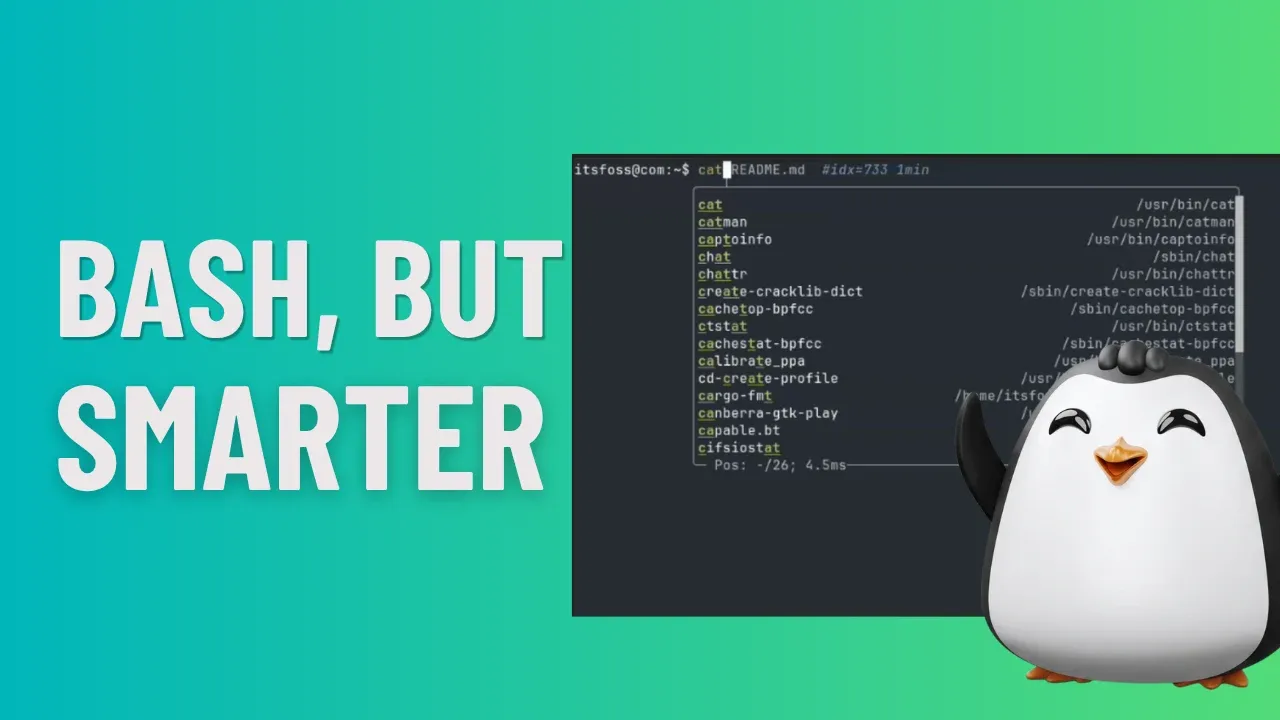
I came across a new tool called Flyline that takes Bash command completion to an entirely different level. No special configuration is required.

0:00
/0:56

For anyone who has control over their shell environment, Flyline could become a must-have terminal tool.

Flyline takes a different approach entirely. Instead of layering on top of Readline, it replaces it outright. It is built in Rust and ratatui to render richer, more interactive terminal interfaces than Readline.

Exploring Flyline features

When I installed Flyline for the first time and started using it, the difference was immediately noticeable. Command suggestions appeared as I typed, making it quicker to complete commands and move through my workflow. It makes working in the terminal noticeably faster.

IntelliSense style autosuggestion

As soon as you start typing, Flyline displays a completion popup right next to the cursor with matching suggestions. This keeps the suggestions close to where you're working, making it easy to complete commands without breaking your typing flow.

0:00
/0:29

Flyline IntelliSense Suggestion

You can cycle through the available suggestions by pressing the Tab key, with the selected entry being updated on the command line in real time. If you prefer, the Up and Down arrow keys work just as well, and the completion list can also be navigated using the mouse.

For longer lists, Flyline includes a functional scrollbar that lets you quickly jump through the available suggestions. Personally, I found it faster to keep typing and narrow down the results rather than reaching for the mouse, but it's nice to have the option.

Once you've found the suggestion you want, press Enter to insert it into the command line and close the completion popup.

Fuzzy search and path completion

Traditional command completion usually expects you to type characters in the correct order. For example, typing pamc won't normally suggest pacman, since the entered characters don't match the expected sequence.

0:00
/0:29

Fuzzy Search

Flyline addresses this with fuzzy search support. Instead of requiring an exact character order, it tolerates minor typos and partial matches, making it much easier to find the command you're looking for. This means you can type a bit more naturally without worrying about getting every character in the right place.

The same fuzzy matching also works for file and directory paths. As you type, Flyline presents matching paths based on your input, allowing you to navigate deep directory structures with fewer keystrokes. I found this particularly useful when working with long or nested paths, where a small typo would normally require me to backtrack and start over.

Automatic completion synthesis (a lifesaver)

Not every command line tool ships with a completion script. Install a new CLI tool and you keep on pressing tab, and nothing happens. No suggestions appear.

When that's the case, Flyline can generate one automatically by parsing the command's --help output and available man pages.

I noticed this while trying ffmpeg, which didn't have a completion script on my system. When I typed:

ffmpeg --<Tab>

Flyline prompted me to generate a completion script for the command. After confirming, it analyzed the available documentation and created a completion definition on the fly. From that point onward, option completion for ffmpeg worked as expected.

0:00
/0:28

Synthesize Suggestions

This is also useful for commands with dozens, or even hundreds, of available options. Instead of repeatedly opening the man page or running --help to look up an argument, I could simply rely on the generated completions and discover the available options as I typed.

It makes working with feature-rich command-line tools much more convenient.

Customize the cursor (for vanity)

This isn't exactly a productivity feature, but it does make the terminal feel a bit more lively.

If you've used the Kitty terminal emulator, you might be familiar with its cursor animations. Flyline brings similar effects to virtually any terminal emulator, letting you customize how the cursor looks and behaves.

To explore the available cursor options, run:

flyline set-cursor --help

This displays the various settings you can tweak, including cursor style and animation effects.

For example, the following command adds a cursor trail that closely resembles Kitty's animated cursor, even if your terminal emulator doesn't support it natively.

flyline set-cursor \
  --backend flyline \
  --style "#33ccff" \
  --interpolate 1.5 \
  --interpolate-easing out-elastic \
  --effect fade \
  --effect-easing in-out-sine \
  --effect-speed 2.0
0:00
/0:30

Cursor Trail Emulation

A refined shell history

Flyline also gives Bash's reverse history search a much nicer interface. Instead of the traditional incremental search prompt, it presents your command history in a dedicated view where you can see each command in full, search through previous entries, and even check when a command was executed.

Refined History

Just like command completion, history search also supports fuzzy matching. This makes it easier to find an older typed command, even if you don't remember the exact sequence of characters.

What impressed me the most, though, was the Canceled Commands feature. The first time I pressed Alt+R, the list was empty. However, every command I subsequently interrupted with Ctrl+C, was automatically added there.

Cancelled Commands

Remember, it is the commands that are interrupted without executing are added to the cancelled list, and not those commands that are executed and then pressed CTRL+C.

This list is kept separate from your regular shell history, so searching your normal command history with Ctrl+R remains unaffected, while cancelled commands are available through Alt+R. The only limitation is that the list is maintained per terminal session, so it is cleared once you close or reset the terminal.

Working with AI agents

Flyline can also work with your favorite AI assistant to turn plain English into executable Bash commands. Once you've configured an AI agent, you can simply describe what you want to do in natural language, and Flyline will ask the agent to generate the corresponding command.

For example, you could type something like:

ai: list files older than three days

Pressing Alt+Enter, or simply Enter if you've configured a trigger prefix such as ai:, sends the prompt to the configured AI agent. Flyline then displays the generated command with syntax highlighting before you decide whether to run it. If the agent returns additional information in Markdown, Flyline renders that as well.

I didn't test this feature personally. I will let you try and comment your experience with it.

Prompt customization

Flyline doesn't just enhance command editing, it also offers extensive prompt customization. You can build rich prompts with dynamic widgets, animations, left and right prompts, transient prompts, live time displays, and even your own custom widgets that run shell commands in the background.

The project's documentation goes into great detail, complete with examples and screenshots for the various customization options. Rather than covering each one here, I've put together a sample configuration that combines several of these features, including a subtle animation. Simply append the following to your ~/.bashrc to give it a try.

# 1. Create the animation widgets
flyline create-prompt-widget animation \
  --name "SPINNER" \
  --fps 12 \
  '\e[38;2;137;180;250m⠋\e[0m' \
  '\e[38;2;137;180;250m⠙\e[0m' \
  '\e[38;2;137;180;250m⠹\e[0m' \
  '\e[38;2;137;180;250m⠸\e[0m' \
  '\e[38;2;137;180;250m⠼\e[0m' \
  '\e[38;2;137;180;250m⠴\e[0m' \
  '\e[38;2;137;180;250m⠦\e[0m' \
  '\e[38;2;137;180;250m⠧\e[0m' \
  '\e[38;2;137;180;250m⠇\e[0m' \
  '\e[38;2;137;180;250m⠏\e[0m'

flyline create-prompt-widget animation \
  --name "PULSE" \
  --fps 6 \
  --ping-pong \
  '\e[38;2;166;227;161m●\e[0m' \
  '\e[38;2;116;199;236m●\e[0m' \
  '\e[38;2;203;166;247m●\e[0m'

# 2. Set prompt variables
PS1='\e[1;32m\u@\h\e[0m:\e[1;34m\w\e[0m\nSPINNER PULSE \e[1;35m❯\e[0m '
PS1_FILL='─'
RPS1='\e[38;2;249;226;175m\t\e[0m'
PS2='\e[2mFLYLINE_PROMPT_LINE_NUMBER ›\e[0m '

# 3. Set transient history cleanup
PS1_FINAL='\e[38;2;166;227;161m✔\e[0m \e[1;34m\w\e[0m \e[1;30m❯\e[0m '
RPS1_FINAL=''
PS1_FILL_FINAL=''

# 4. Enable cursor trail & motion
flyline set-cursor \
  --backend flyline \
  --style "#cba6f7" \
  --interpolate 1.5 \
  --interpolate-easing out-elastic \
  --effect fade \
  --effect-easing in-out-sine \
  --effect-speed 2.0

Restart your terminal and enjoy the effects.

0:00
/0:11

Custom animated Prompt

Install Flyline

The easiest way to install Flyline is by using the official installation script. Open a terminal and run:

curl -sSfL https://github.com/HalFrgrd/flyline/releases/latest/download/install.sh | sh

The installer downloads the latest release and automatically updates your ~/.bashrc to load Flyline, so there's no need to perform any additional setup manually.

Once the installation is complete, launch the interactive tutorial with:

flyline run-tutorial

I recommend going through the tutorial before you start using Flyline. It walks you through onboarding, making it much easier to get comfortable with the enhanced editing experience.

Uninstall Flyline

If you decide Flyline is not for you, uninstalling it is straightforward. The installation script does not currently provide a dedicated uninstall option, so you need to remove the Flyline library and the line added to your ~/.bashrc manually.

Here is how the installation script installed Flyline.
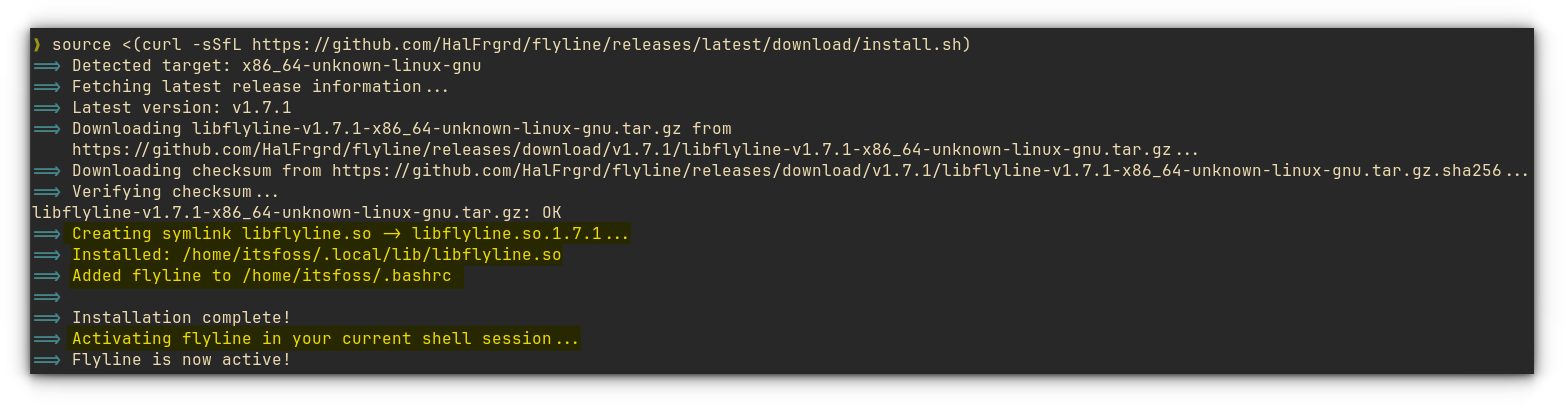
Installing Flyline using the official installer script.
Installing Flyline

So, to uninstall, first, disable Flyline in the current Bash session:

enable -d flyline

Now, remove the installed library:

rm -f ~/.local/lib/libflyline.so*

Finally, open your ~/.bashrc and remove the line that loads Flyline. It should look similar to this:

enable flyline 2>/dev/null || enable -f "~/.local/lib/libflyline.so" flyline

Delete the Flyline command loading from Bash RC file.
Delete Flyline from ~/.bashrc file

Save the file and start a new terminal session. Flyline should now be completely removed.

Is there anything similar for ZSH?

When I started using Flyline, apart from its intellisense style completion, I can't say it felt like a first in a lifetime moment, because I kind of used a similar functionality in ZSH for some time.

Flyline is designed exclusively for Bash, so you can't use it with Zsh.

But, the combination of zsh-syntax-highlighting, zsh-autosuggestions, and zsh-autocomplete covers many of the features you'd expect from an IntelliSense-like command-line interface.

Together, they offer inline suggestions, syntax highlighting, and interactive command completion that make working in the terminal much more comfortable.

ZSH Autosuggestion, Syntax Highlighting and Auto Complete

If you pair these plugins with a prompt framework like Starship or a Powerline-style prompt, you can build a polished and highly productive terminal environment.

Wrapping Up

Flyline is one of the new breed of terminal tools that are built in rust to be faster and provide features that either require too much config effort or not possible in classic GNU tools at all.

From intelligent command completion and fuzzy search to AI-assisted command writing and prompt customization, Flyline adds plenty of quality-of-life improvements without changing the shell you've grown accustomed to.

Give Flyline a try. It's already a capable tool, and with active development, it'll be interesting to see how it evolves in the future.

Read the whole story
jhunorss
6 hours ago
reply
It is bash only, unfortunately. But the article mentions that you can do similar stuff with zsh already. Which I am putting to the test momentarily.
Share this story
Delete

This Tiny Fingerprint Key Unlocks Linux, Approves SSH and AI Agents

1 Share
Immurok review

A laptop fingerprint sensor unlocks the laptop and usually stops there. Immurok wants to do quite a bit more than that.

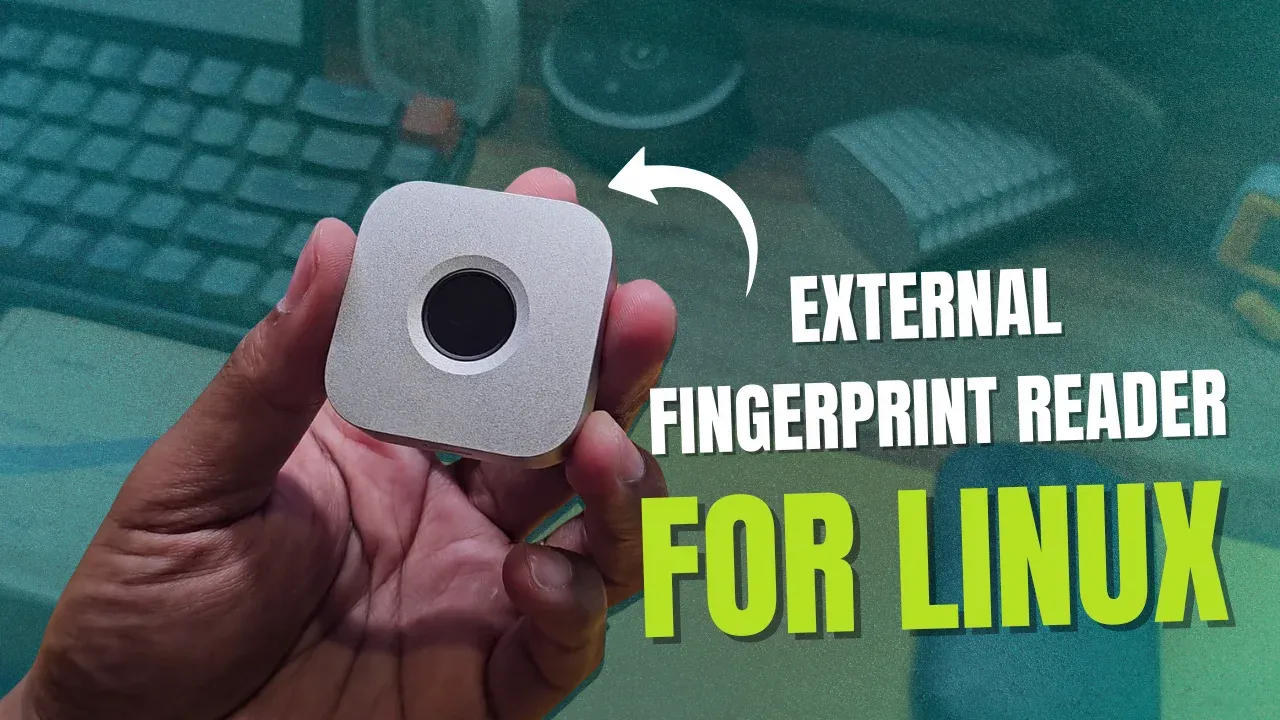
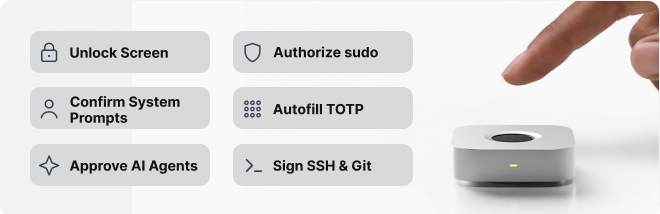
It is a tiny wireless box that can unlock your desktop session, approve a sudo command, authenticate via polkit, log you into a server over SSH, generate TOTP codes for 2FA, and put a physical touch in front of an AI coding agent. And it does all of that with the same finger, over Bluetooth.

The good news is that the core features work. The less good news is that on Linux, getting there was not as simple as touching a sensor. During my testing I ran into bugs, missing prompts, confusing behaviour, and one timing issue that made the initial setup a little challenging. But once things were setup, the device worked smooth and that's what matters, right?

Let's take a detailed look at what Immurok gets right, what still needs work, and whether this little box could earn a place on your desk.

📋
Immurok supplied this unit for review. They had no control over my conclusions. Also note that this is a pre-release unit and the software is changing quickly, so the version that ships to backers is likely to behave differently. Another thing is that this is a usage review, not an independent audit of the hardware, firmware, or cryptography.

I also have a video review of Immurok, if you prefer watching over reading.

What Immurok actually does

At its simplest, Immurok is a wireless fingerprint reader for a desktop or a laptop that does not already have one. But the feature list goes well beyond unlocking a screen.

You can use it to unlock an existing desktop session. Through Linux PAM integration, it can approve sudo and other supported authentication prompts such as polkit. It can generate and store SSH private keys on the device itself, and it can release a TOTP code only after it recognises your fingerprint.

Immurok features

Then there is the more unusual usage: AI-agent approval. The idea is that a coding agent can prepare a privileged command, an SSH operation, or a request for a secret, but it cannot complete the protected action until you physically touch the sensor.

According to Immurok, fingerprint templates and private keys stay on the device. There is no cloud account and no telemetry. Pairing uses P-256 ECDH with HMAC-SHA256, and authentication responses are cryptographically signed.

Those are the company's security claims, and as I said above, this review tests how the device behaves in use rather than auditing that cryptography.

The hardware

The hardware makes a good first impression. Here is what you are getting.

Spec Detail
Processor RISC-V, up to 60 MHz
Connectivity Bluetooth Low Energy
Sensor Capacitive fingerprint, under 500 ms claimed recognition
Dimensions 44 x 44 mm, 14.2 mm thick
Weight ~40 g
Body CNC aluminium
Battery 110 mAh, USB-C charging
Standby draw ~50 µA claimed
Fingerprint slots Up to 5 authentication fingerprints

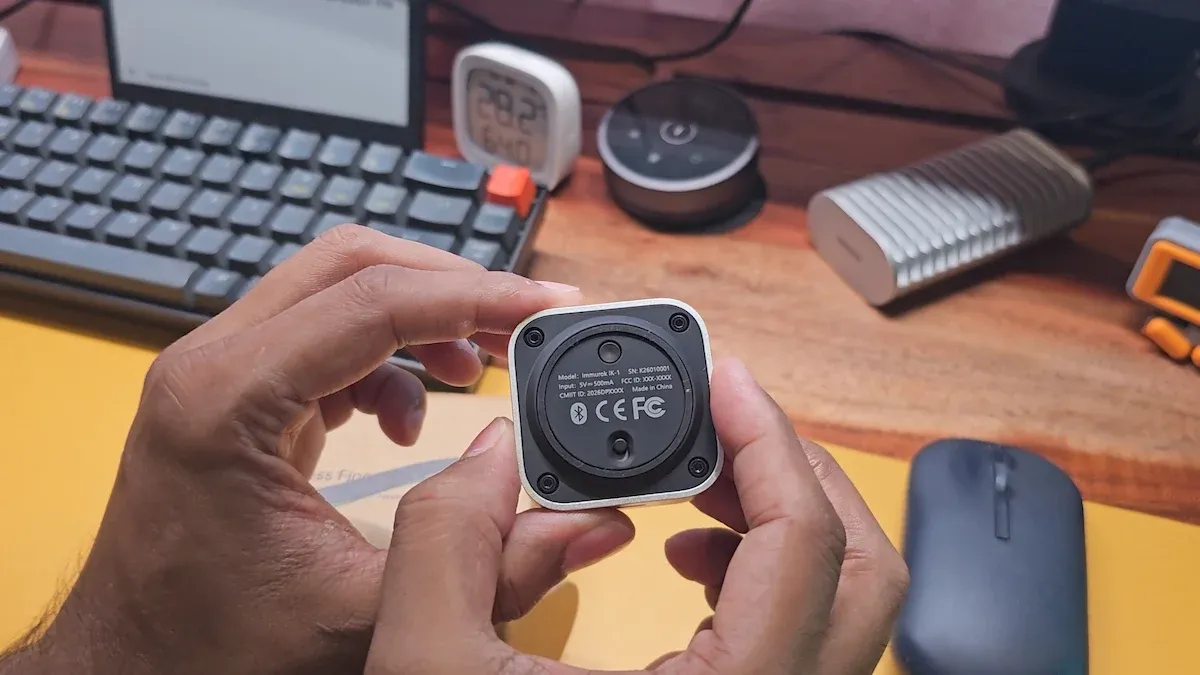
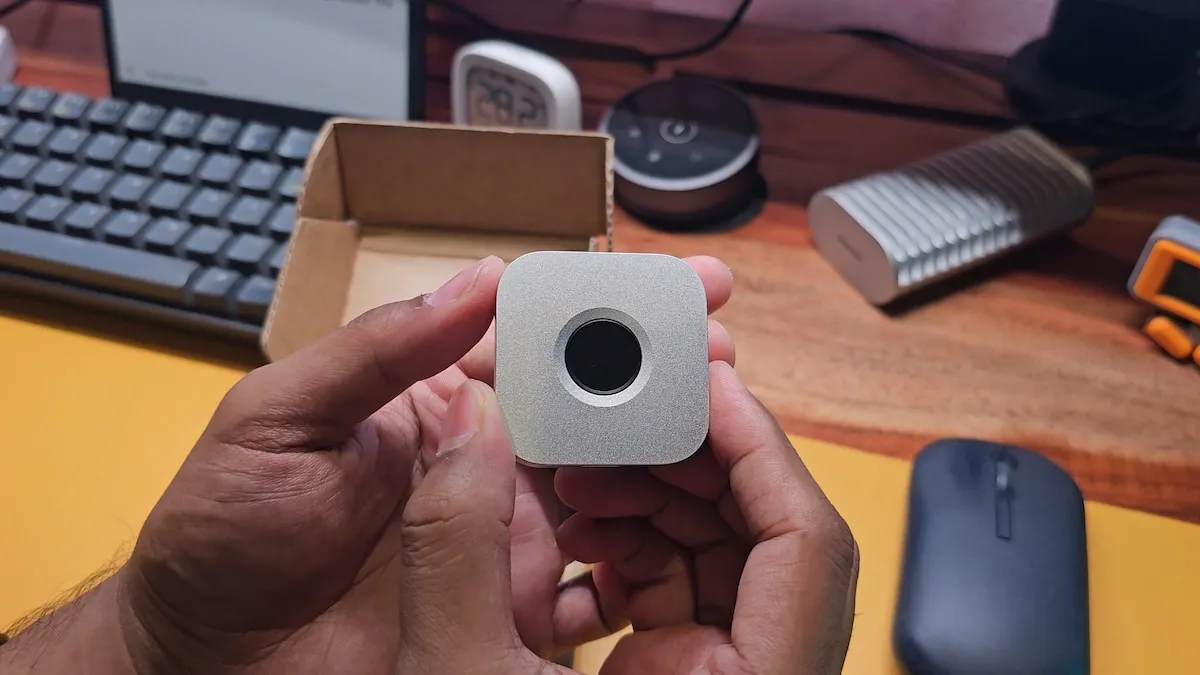
There are controls at the back for power and for actions such as pairing or confirmation. The silver finish, rounded corners, and proportions make it look like a tiny Mac mini. That is not a complaint and even works well for people in the Apple ecosystem. It is neat enough to sit on a desk without looking like a random security dongle.

Immurok from back

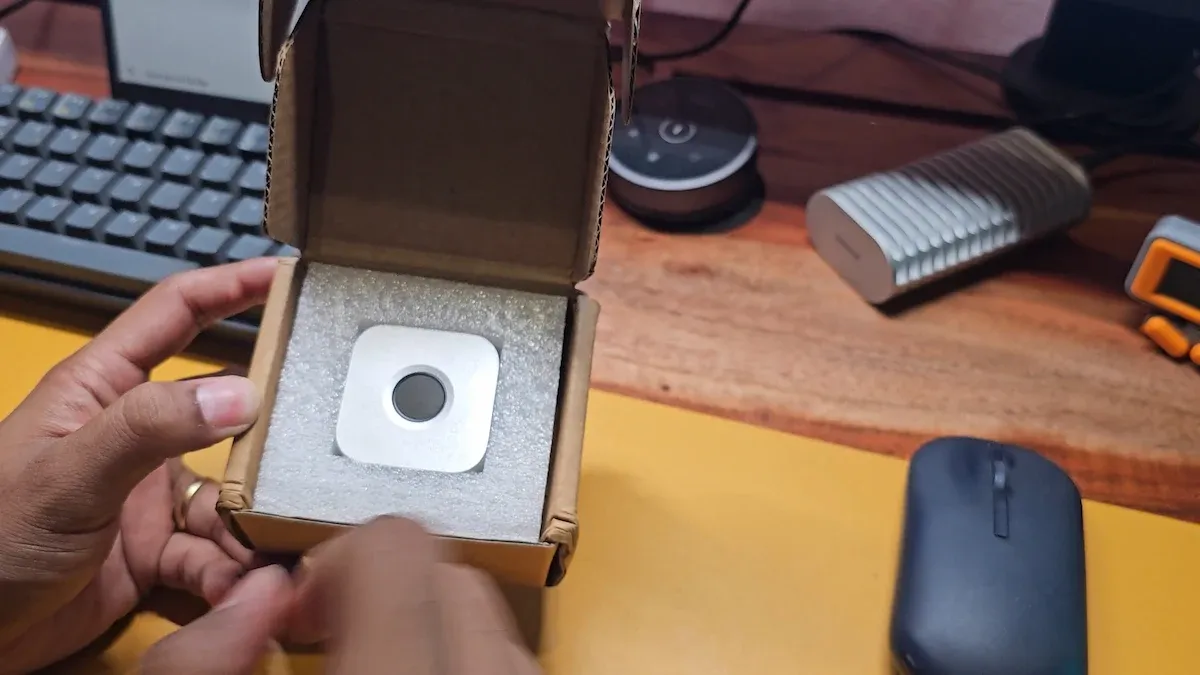
My review box contained only the device. There was not even a USB cable and I am not complaining. The battery life is pretty good, so charge is needed like once a month and type C cable is in every household, I presume.

Immurok unbox

Immurok claims more than a month of normal use per charge. When I started testing, the Linux TUI showed 84% battery on the first run. After roughly a week, it was at 78%, so about 6 percentage points in that period. That looks promising for the month-long claim, but one week is not enough to confirm it, especially since battery-percentage readings are not always perfectly linear.

Installing on Linux means building it yourself

Windows and macOS get graphical applications. On Linux, the version I tested used a Rust daemon, a command-line client, and a terminal user interface. There was no equivalent graphical management app and no easy-to-install binary as well.

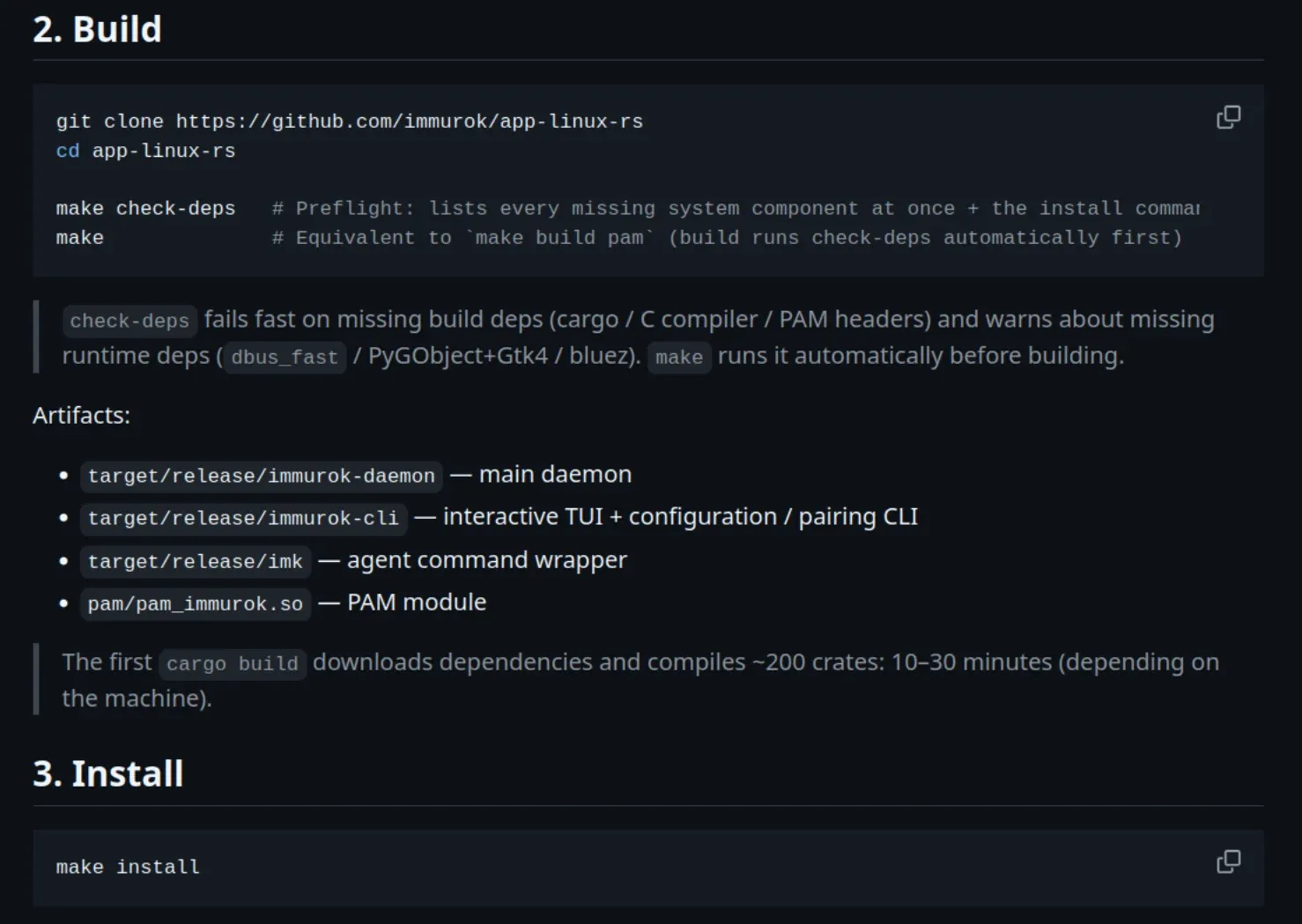
On my Ubuntu 26.04, I first installed the required development and runtime packages, then Rust through Rustup. The make check-deps command was helpful here, because it listed the missing components instead of making me discover them one build error at a time.

Immurok linux install instructions
Immurok Linux app needs to be built from source code

Then came the first Rust build, with around 200 crates to download and compile. It kept the CPU busy and produced plenty of warnings, though these were warnings and not compilation failures.

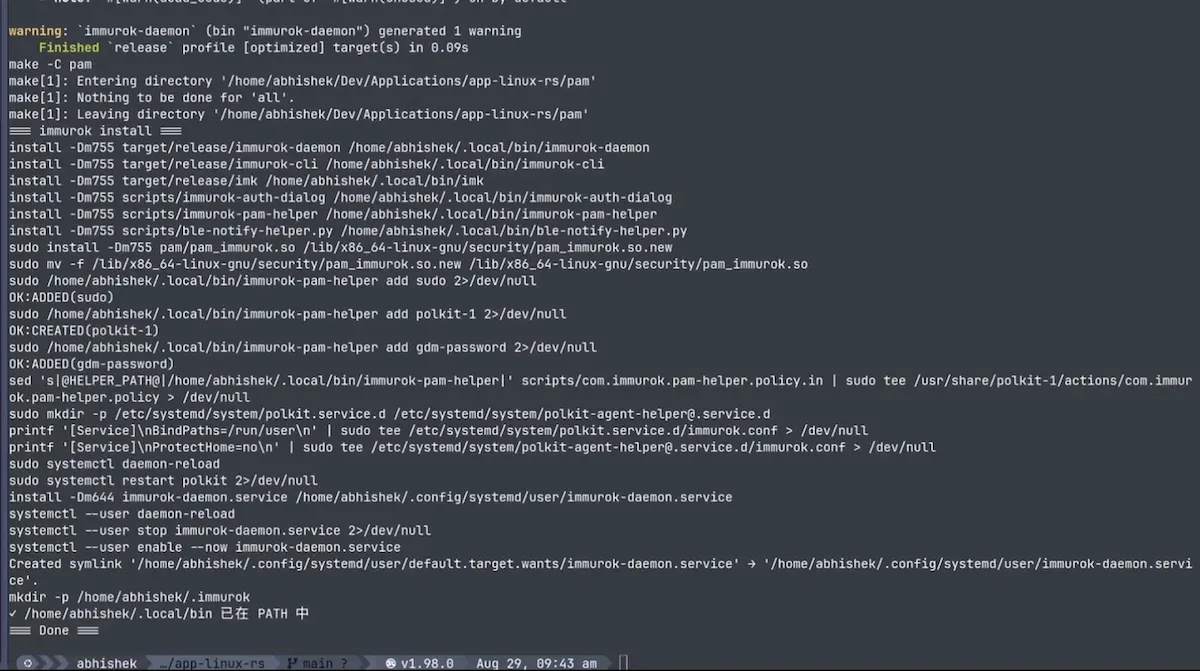
After that, make install was fairly quick. It installed the daemon, the command-line tools, the PAM module, the authentication helper, and the system integration, and the user-level daemon was already running when the install finished.

Immurok Linux app installed

For an experienced Linux user, this is all doable. But for a device that presents itself as a simple replacement for typing passwords, it is too much friction. Before this ships to general users, Linux needs straightforward packages for the supported distributions and a much clearer first-run flow.

Pairing: connected is not the same as paired

The first pairing attempt immediately showed how early the software was.

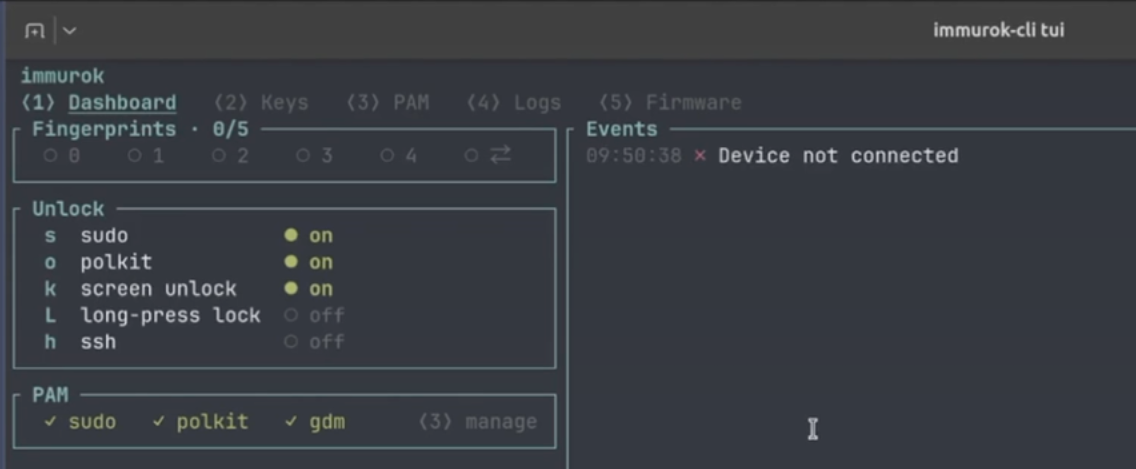
I powered on the device and tried pairing from the TUI. It said the device was not connected. The CLI told me to press the device button within 30 seconds, but then failed immediately. It did not wait for 30 seconds at all.

Immurok failed initially

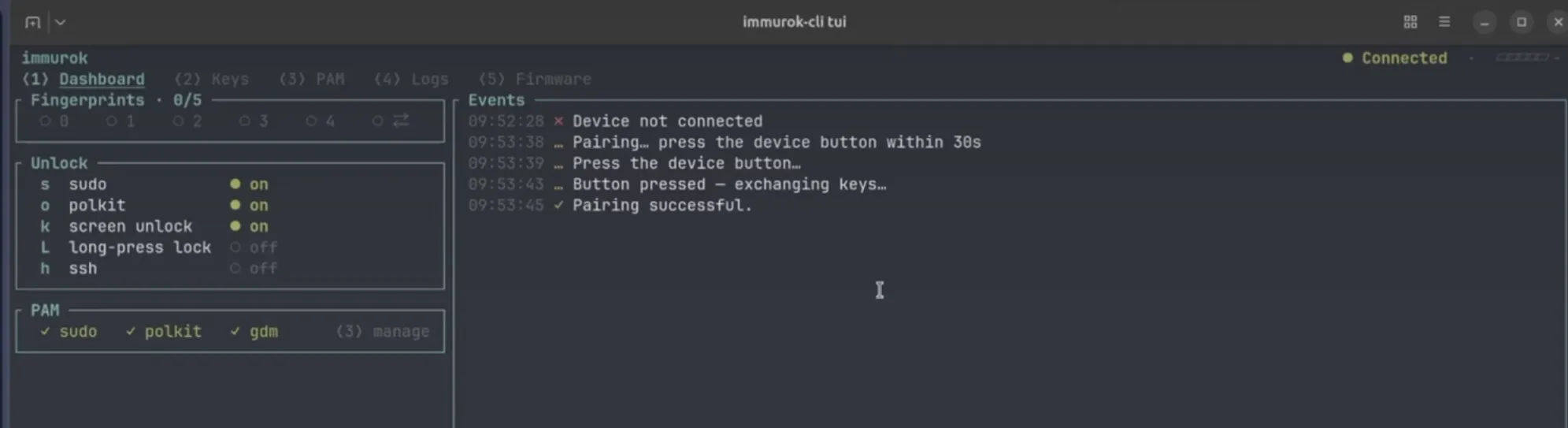
What eventually worked was connecting Immurok manually through Ubuntu's Bluetooth settings first. Once the operating system showed it as connected, I went back to the Immurok TUI, pressed p, and then pressed the button on the device. It exchanged keys and reported that pairing had succeeded.

Immurok connection succeeded

So there are two separate states here: connected over Bluetooth, and paired inside Immurok. That distinction may be technically reasonable, but the application never explained the required sequence when I actually needed it.

The product should walk you through this step by step, including the LED state, the operating-system connection, the Immurok pairing action, and the button press.

Enrolling fingerprints

Once the device was connected and paired, enrolling the first fingerprint went more smoothly.

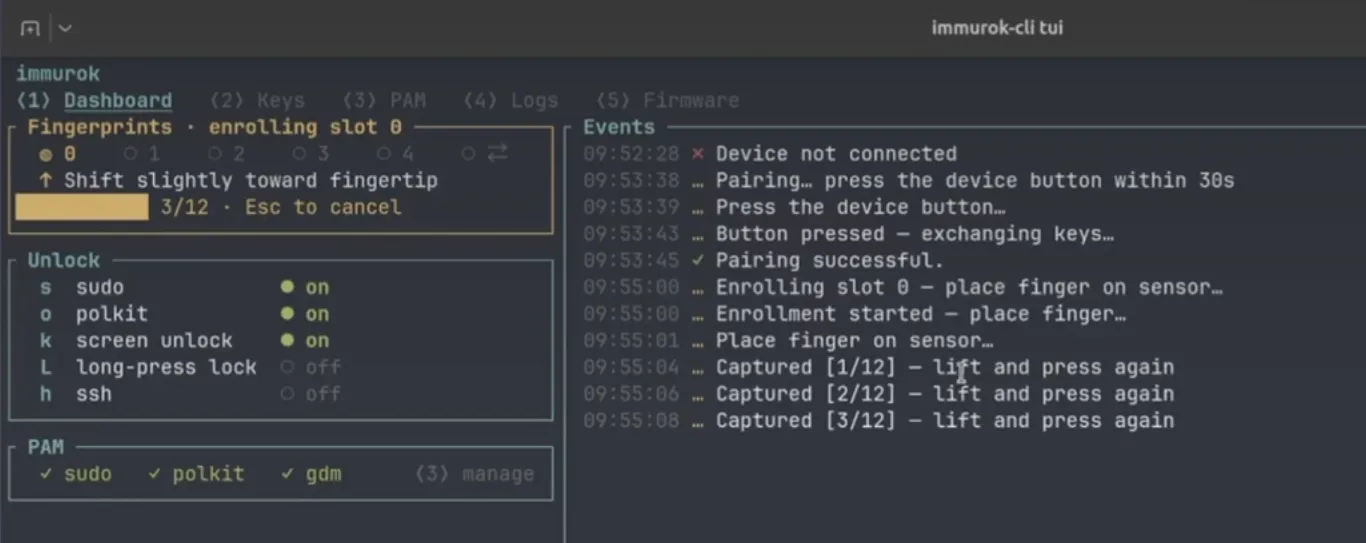
In the TUI, I pressed e, placed my finger on the sensor, lifted it, and repeated. My test firmware asked for 12 captures before it enrolled the finger in slot zero.

Immurok fingerprint enrol

The device supports up to 5 normal authentication fingerprints, and when you add more after the first one, an existing authorised finger has to approve the new enrolment. That is a sensible security requirement, but again, it needs to be stated clearly on screen.

The command line interface is finiky at times. At one point, trying to enrol again failed because the fingerprint was already present, and a deletion attempt simply failed without explaining why.

📋
This is a recurring pattern in the CLI tool. The device often knows exactly what it needs from you, but the software does not always tell you.

The bug that stopped sudo from working

With a fingerprint enrolled, I tested sudo apt update. Nothing happened. Touching the sensor did not authenticate me, even though the fingerprint was clearly there.

The problem turned out to be a race in the Linux daemon. When the Bluetooth session began, the daemon immediately asked the device for its status. But a Python notification helper was still starting up its D-Bus connection. On my machine, that helper took about 5.2 seconds to become ready, while the status request timed out after 5 seconds. That tiny difference left the daemon with no device status for the rest of the session, which showed up as NO_STATUS.

Since I had installed Claude for testing the agent specific features of Immurok, I let it handle the issue and it fixed that by increasing the limit to 15 seconds.

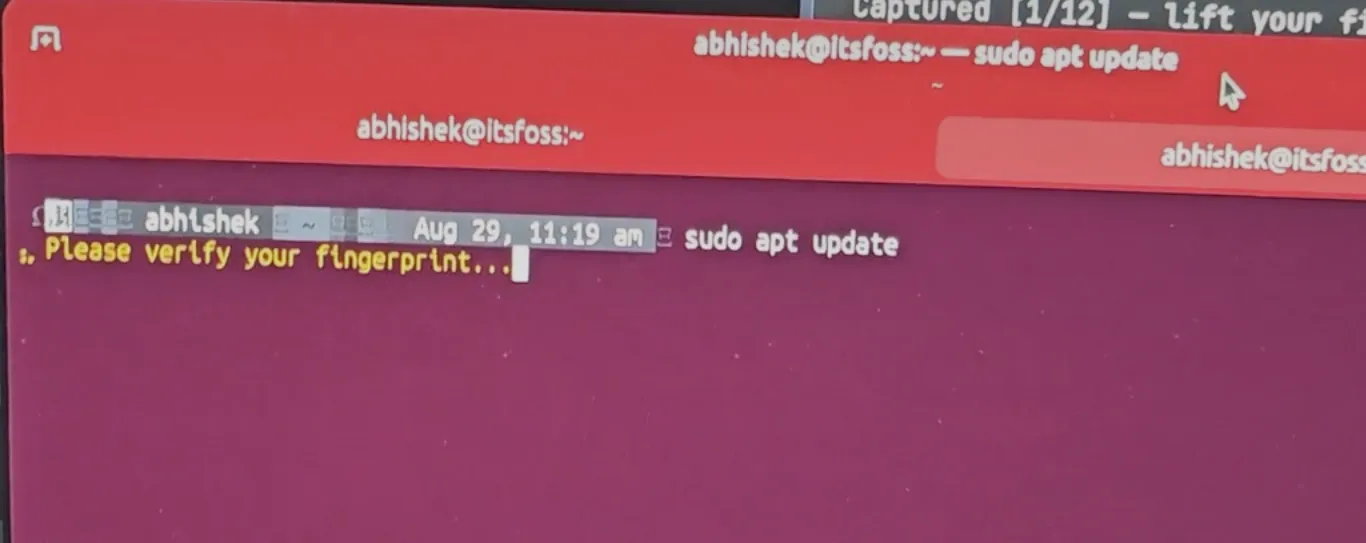
After rebuilding and installing the patched version, sudo authentication worked. I ran the command, touched the sensor, and it continued without asking me to type the account password.

Immurok sudo fingerprint

It is a good thing that the code is open enough to inspect and fix. But this was also a basic authentication path failing because one helper started a fraction of a second slower than expected. These things should be fixed before the mass release.

📋
Update: This bug has been fixed by Immurok in a recent update.
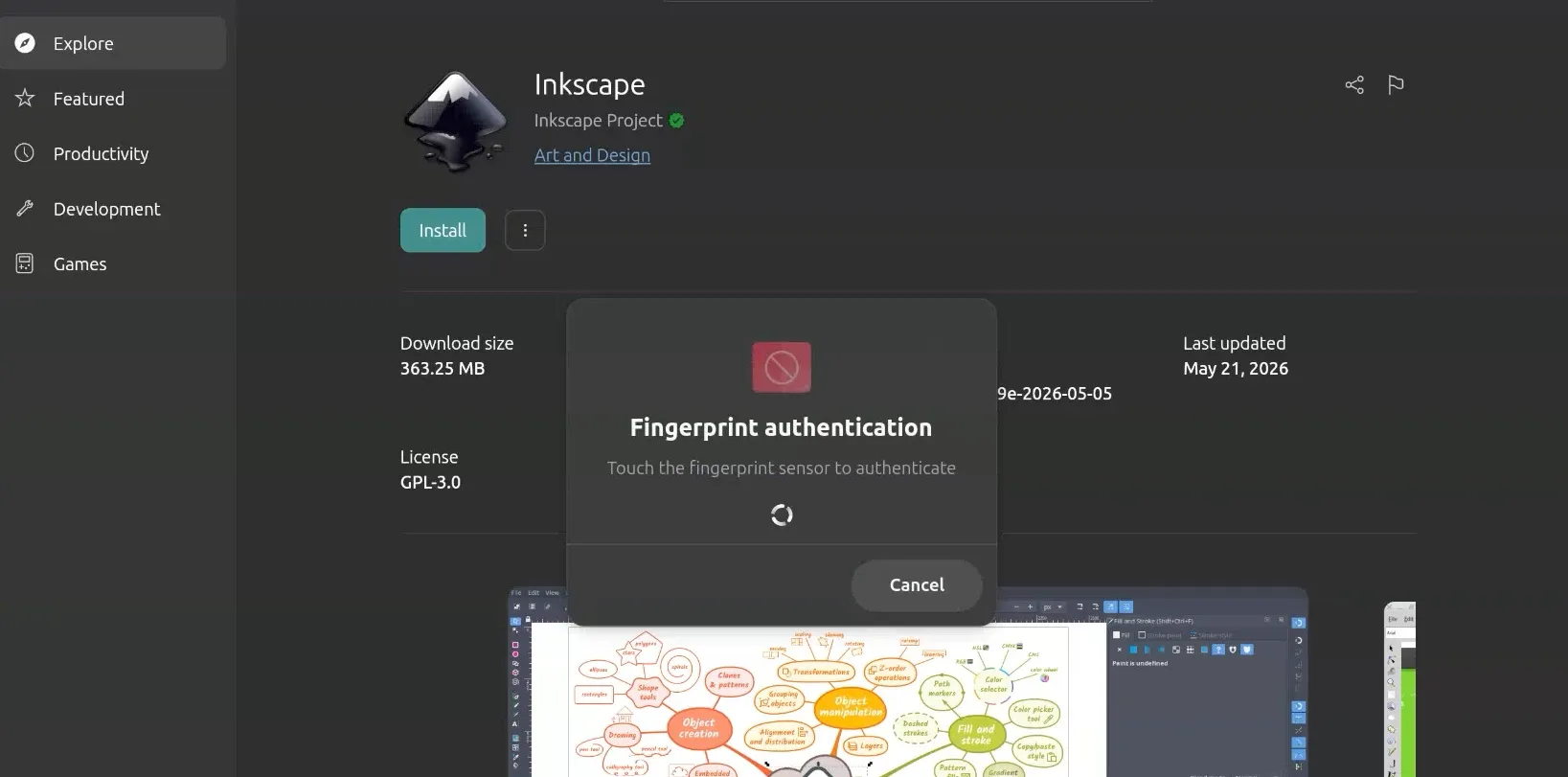
Immurok Polkit Authentication

Unlocking Ubuntu, and why fallback matters

With the patched client, Immurok could unlock an Ubuntu session that I had already logged into and then locked. I touched the sensor and the desktop opened.

It did not work at the very first login screen after powering on the computer, though. That is intentional behavior applicable to macOS and Windows too. The user-level service is available for unlocking an existing session, but the initial login still needs the normal account password. This distinction matters, because "screen unlock" can easily sound like "replace your password at every login," and they are not the same thing.

The fallback behaviour was good. When I disabled Bluetooth or disconnected Immurok, sudo and login did not leave me waiting for a fingerprint device that was no longer there. They went straight to the usual password field. That is essential. A convenience device should never turn a temporary Bluetooth glitch or a flat battery into a lockout.

SSH keys are the highlight

SSH is where Immurok starts to become more interesting than an ordinary fingerprint reader.

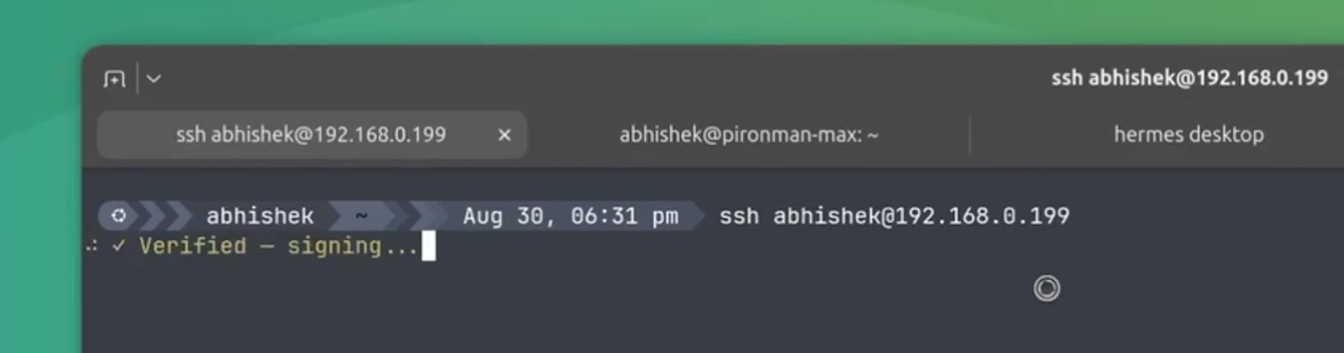
ssh access via Immurok

It can generate an ECDSA P-256 SSH key on the device. The private key stays there, and you export only the public key to place in the remote server's authorized_keys file.

ECDSA is a practical choice here because it can deliver security comparable to RSA using much smaller keys. That means less storage, less data to transfer, and lower processing overhead, making it suitable for a small battery-powered device.

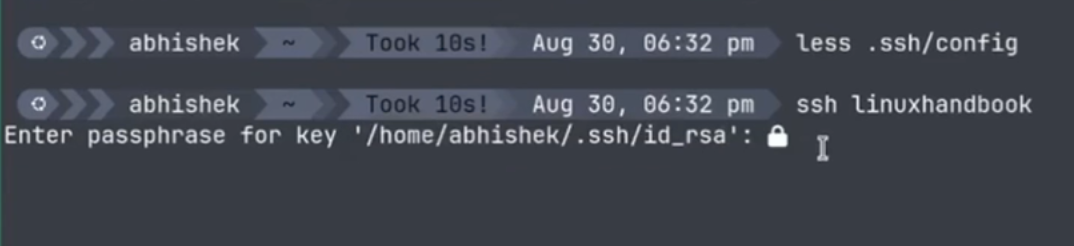
The first time I generated a key through the CLI (not the TUI), it appeared to just stop. The missing piece of information was that Immurok was waiting for my fingerprint authorization. There was no prompt telling me to touch the sensor, and no useful feedback when I did. I only knew what to try because I had already been digging into the behaviour. Once I touched the sensor, the key was generated.

If an action requires physical authentication, the interface has to say so. The TUI was better here. When I generated another key there, it explicitly told me to touch the sensor to authorise the action, and the key then appeared in the next slot.

I exported the public key, added it to my Raspberry Pi Pironman Max, and enabled Immurok's SSH takeover. This adds the Immurok agent socket as the SSH IdentityAgent, which gives the device-backed keys priority.

When I connected to the Pi, Immurok asked for my fingerprint, I touched the sensor, and the SSH login succeeded.

Importantly, my normal SSH setup was not destroyed. Existing keys on the computer stayed available as a fallback, so when I connected to a server that did not have the Immurok public key, SSH just continued using my existing key.

SSH key fallback with Immurok

That is the right approach. You can introduce Immurok gradually instead of forcing every server to change on day one.

You can delete keys through the TUI after fingerprint approval, or through the CLI, though the CLI again failed to show the required fingerprint instruction during deletion. You can also import an existing private key onto the device, but with two limitations.

Import was only available through the CLI in my tested version, and it accepted only ECDSA P-256 keys. If your existing key is Ed25519, RSA, or another format, you cannot simply move it over to Immurok.

📋
After a firmware update, I can now see a dual-host option in the Linux TUI, which is an important change because earlier notes described this workflow as unfinished. But seeing the option is not the same as testing it. I have not yet confirmed that a second computer can pair successfully, or that the keys already stored on Immurok can then be used from that second host. For now, dual-host support is visible but the full cross-host SSH workflow is unverified.

TOTP just works

Immurok can also hold TOTP secrets, and this was one of the smoother experiences.

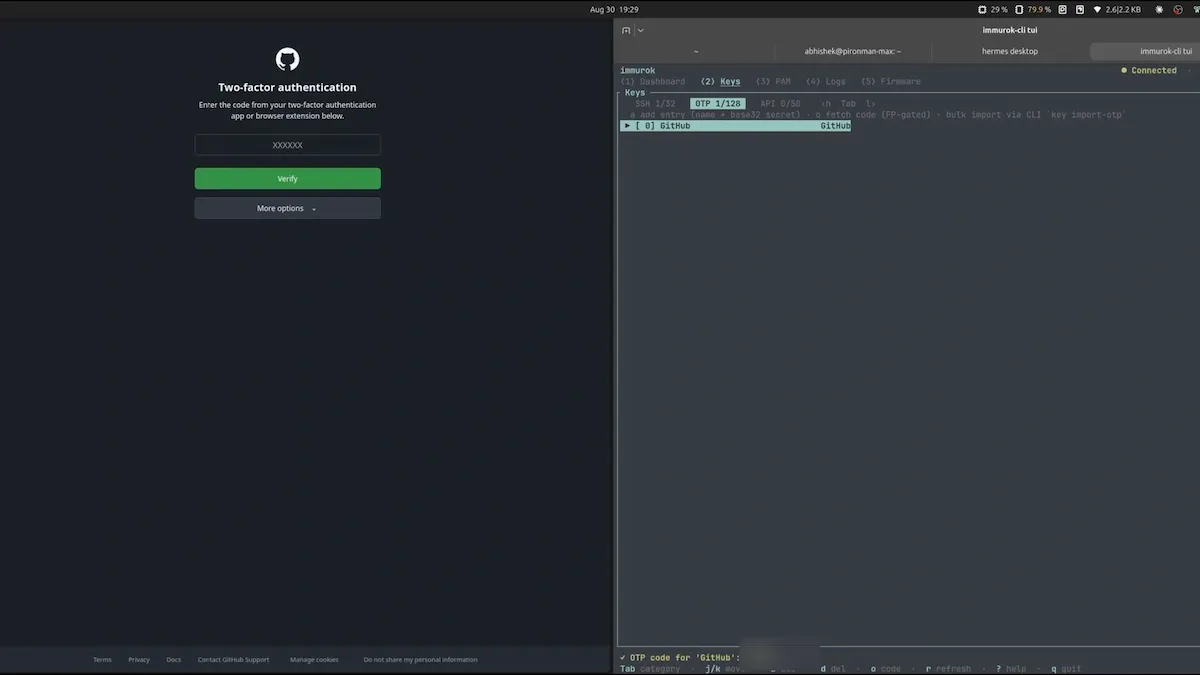
I added a GitHub TOTP entry, went into Immurok TUI, and then requested a code. Fetching the code required another fingerprint touch. I entered that code into GitHub, and it worked.

GitHub TOTP with Immurok

This is a simple feature, but a useful one. The TOTP seed is not sitting in a general desktop authenticator, and someone using your unlocked computer still needs your fingerprint before Immurok will release a code. As always, recovery codes still matter. If the device is lost, damaged, discharged, or reset, you need another way into the account.

Putting a fingerprint in front of an AI agent

The most distinctive pitch is using Immurok as a human-in-the-loop control for AI coding agents.

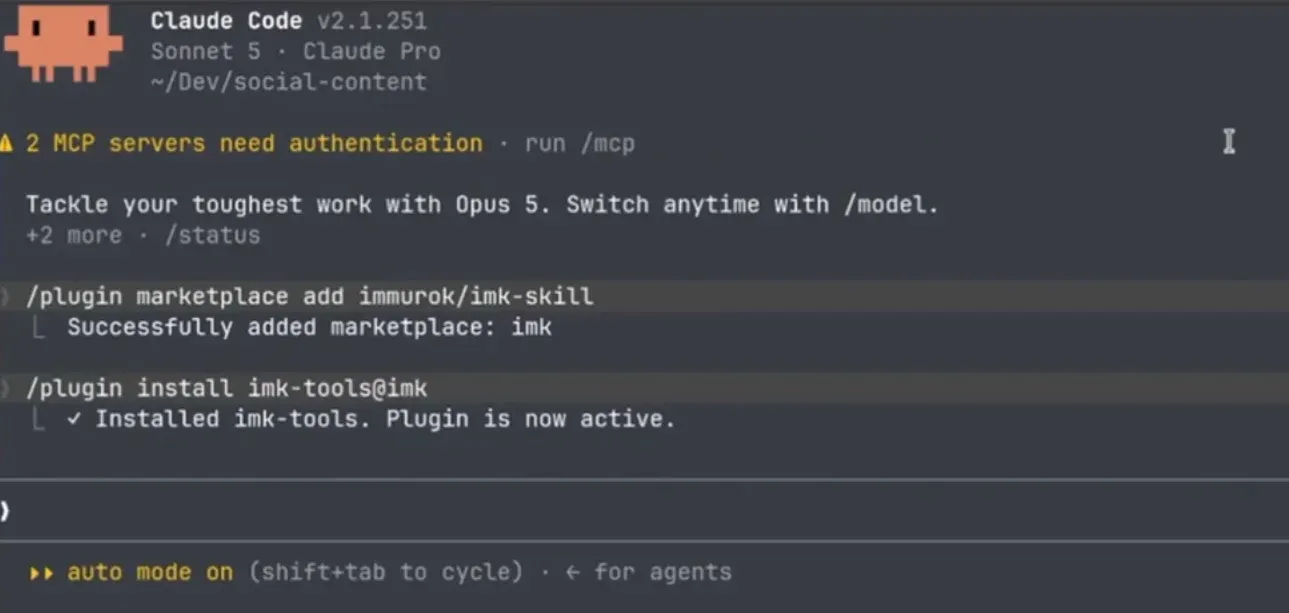
I installed the Immurok plugin for Claude and activated it for the project. Immurok also provides an imk wrapper that can launch a command in agent mode. In one test, the agent tried to connect to my Raspberry Pi over SSH, Immurok requested fingerprint verification, and after I touched the sensor, the agent connected to the Pi.

Immurok-Ai-plugin

The idea is that even if the computer is unlocked, the agent cannot complete a protected wrapped action while you are away from the desk.

But there is an important limitation: this is only a gate if the action actually goes through the gate. Project instructions may tell an agent to use imk, and a plugin may make that tool available, but an ordinary command can still take the normal route if the wrapper is bypassed. My earlier Git push did exactly that, because it was not wrapped.

So this is not automatic enforcement just because a file tells the agent what to do. A serious setup has to arrange for sensitive operations to always run through imk run --agent, or to enforce the protected path at a lower level. Immurok can provide a valuable physical approval mechanism. It cannot secure a workflow that still leaves an unprotected path open right beside it.

📋
My recordings do not include a complete, successful API-secret test. The intended design is to inject a secret only into the approved child process, without placing it in the agent's conversation. That is a good idea, but I am not claiming that part as fully tested here.

Things that could be better

Even with the core features working smoothly after the setup, a few rough edges are worth calling out clearly. None of these are dealbreakers on their own, but together they are the difference between "promising" and "ready."

The TUI and CLI need serious polish

The Linux TUI brings together the dashboard, keys, PAM integration, logs, firmware updates, and settings. It shows connection state and battery percentage, and for most tasks it communicates better than the CLI does.

The CLI version lacks tab completion, which made nested commands harder to discover. Pairing claimed it would wait and then failed. Failed enrolment and deletion did not give useful explanations, and SSH import lived only in the CLI while other actions were easier to follow in the TUI.

Documentation is not optional for a tool like this. Immurok touches PAM, Bluetooth, SSH configuration, private keys, TOTP, etc. The GitHub README has details, but buyers need a stable setup guide, clear in-app prompts.

The log file that never stops growing

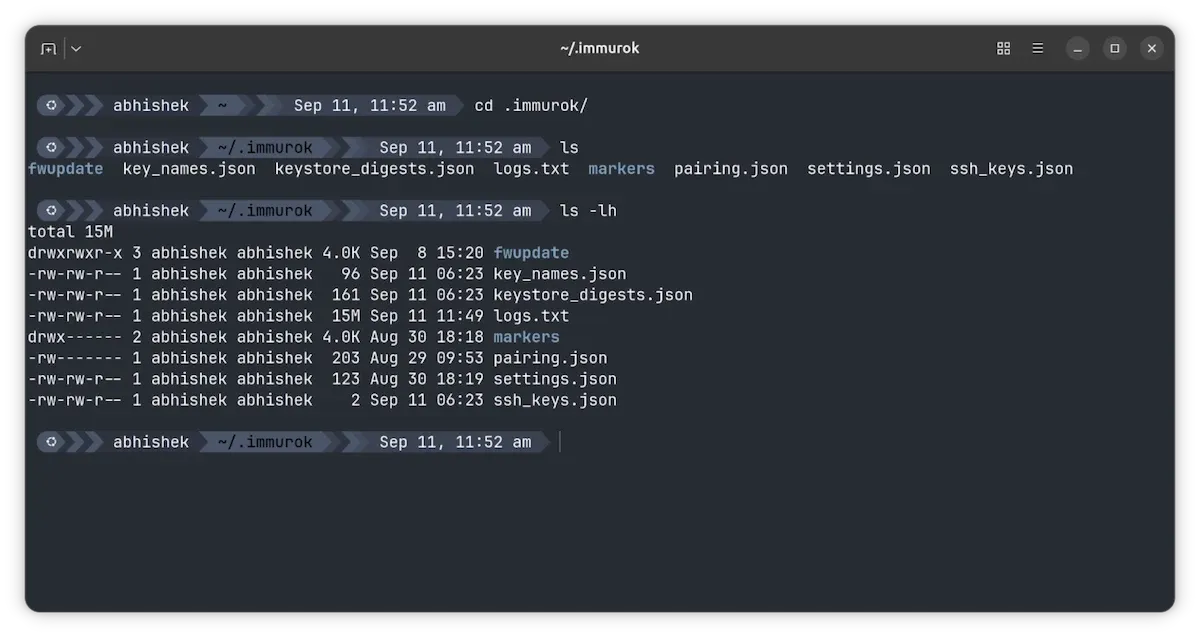
There is one smaller issue that gets bigger with time. The daemon continuously writes to ~/.immurok/logs.txt. After about a week, mine had reached roughly 4 MB. After 2 weeks, it is 15 MB.

Immurok log file size issue

At a steady rate, that is closer to 200 MB a year than multiple gigabytes. But the real problem is that the file looks unbounded, and a persistent reconnect loop or a recurring failure could make it grow much faster. The application needs log rotation with a sensible size and retention limit.

On Linux, sending routine logs to the journal would make far more sense than quietly maintaining an ever-growing private text file.

Is Immurok worth it?

After more than a week, I am more than happy to use Immurok as a daily driver. The trouble was mostly at the initial setup stage, and I am way past that now.

I liked the fingerprint reader on my Dell XPS in the past. My present laptop, Asus Zenbook, doesn't have one, so the Immurok fingerprint reader complements it very well.

Immurok fingerprint

The hardware is attractive, compact, and useful, and the core features work well. I used a fingerprint to approve sudo, unlock an existing Ubuntu session, authenticate an SSH connection to a Raspberry Pi, retrieve a working GitHub TOTP code, and approve an agent-run SSH action.

I also like the fallback design. A disconnected device did not block password login, and servers that were not configured for the Immurok key kept working with my existing SSH keys.

The hardware works great and the software on Linux needs upgrade. Source code build should not be forced onto users in 2026. The CLI needs to be better at showing the appropriate feedback message.

I have already seen two firmware updates and there is a software update already on their repo. So, it's just a matter for software updates and the device would become suitable for even the beginners.

So, if you think that the device suits your workflow and it doesn't dent your budget, you can opt for Immurok.

✅ Real, working fingerprint approval for sudo, polkit, SSH, TOTP, and screen unlock
✅ Private keys and fingerprint data stay on the device, with sensible password and key fallback
✅ Compact, well-built aluminium hardware with promising battery life
❎ Linux install means building from source; there is no packaged app yet
❎ The CLI is buggy, TUI is okay. Docs need to be included. Software update should fix the issue.

Getting Immurok fingerprint key

At the time of writing this article, Immurok is still in crowdfunding. It is available through Kickstarter for $59 US, with a stated retail price of $69 and estimated delivery in November 2026.

Please readhe their terms and conditions on shipping, custom fee and return policy.

I tested the pre-release review unit and the software is already changing quickly. The version shipping to backers is still a few months away, so there is time for the Linux experience to improve before customers receive the device. I do hope the installation, pairing, prompts, documentation, and reliability are all much better by November.

For now, I am happy to have Immurok on my desk.

Read the whole story
jhunorss
12 hours ago
reply
Share this story
Delete

Sie wollen eine Pause. Es wird keine geben

1 Share

OpenAI will 2026 nicht mehr an die Börse. Die BegrĂŒndung, die Sam Altman offiziell gibt ist AI Safety. Zugleich erklĂ€rt er sich bereit, die Entwicklung leistungsfĂ€higer Modelle gemeinsam mit anderen Labs zu verlangsamen. Anthropic fordert ebenfalls eine koordinierte Pause.

Ich glaube denen den Wunsch nach der Pause, aber ich glaube die Geschichte dahinter nicht.

Die AI-Firmen entdecken die Notwendigkeit einer Pause genau in dem Moment, in dem ihnen die Finanzierung davonlĂ€uft, ein Börsengang ihre kaputten Economics offenlegen wĂŒrde und Open-Weights-Modelle anfangen, auf Rechnern unter einem Schreibtisch nĂŒtzlich zu werden.

Das ist kein Zufall. Die Pause soll nicht den amoklaufenden Maschinengott aufhalten, sondern einen Investitionszyklus verlÀngern, der seine Kosten absehbar nicht mehr einspielen kann.

Die Kreditmaschine

AI sieht von außen wie ein SoftwaregeschĂ€ft aus, aber in Wahrheit ist Frontier AI eine kapitalintensive Schwerindustrie.

Man braucht GrundstĂŒcke, Hallen, Umspannwerke, StromvertrĂ€ge, KĂŒhlung, Netzwerk, RAM, NVMe und sehr große Mengen Beschleuniger. Die Softwaremargen kommen erst danach, falls ĂŒberhaupt.

Die Anbieter haben diese Infrastruktur nicht aus laufenden Einnahmen bezahlt. Stattdessen haben sie eine Kreditmaschine gebaut:

  • OpenAI, Anthropic, xAI und andere versprechen langfristigen Compute-Bedarf.
  • Oracle, CoreWeave und die Hyperscaler bestellen Hardware und Rechenzentren.
  • Banken, AnleihemĂ€rkte, Private Credit und Zweckgesellschaften finanzieren den Bau.
  • Hersteller und Rechenzentrumsentwickler bekommen Abnahmegarantien.
  • Die VertrĂ€ge werden als BegrĂŒndung fĂŒr die nĂ€chste Finanzierungsrunde verwendet.

Dabei entstehen ĂŒberall UmsĂ€tze, Forderungen, Backlogs und Bewertungen. Cash entsteht sehr viel spĂ€ter, und der einzige Weg, auf dem Cash entstehen kann, ist wenn Unternehmen AIaaS kaufen und Token abnehmen. Und es sieht zunehmen so aus, als mĂŒssten sie das nicht tun.

Die Finanzierungen sind zum Teil ĂŒberzeichnet. Das klingt gesund, bedeutet aber nur, daß mehr Investoren eine hoch verzinste und gut besicherte Forderung kaufen wollen, als die Emission groß ist. CoreWeave konnte im Mai 2026 eine ĂŒberzeichnete Finanzierung wĂ€hrend der Syndizierung sogar um 50 Basispunkte billiger bekommen.

Der Markt ist nicht leer. Das billige, unbesicherte und bedingungsarme Kapital ist leer.

Deswegen wandert die Finanzierung in besicherte Kredite, GPU-backed Loans, Project Finance, Sale-and-Leaseback, Private Credit, auslĂ€ndische AnleihemĂ€rkte und Staatsfonds. Die OECD erwartet , daß Private Credit in vier Jahren ungefĂ€hr 800 Milliarden USD zur AI-Expansion beitragen soll. Sie schreibt im selben Bericht, daß selbst das fĂŒr den geplanten Ausbau nicht reicht.

CoreWeave

CoreWeave ist die Kreditmaschine ohne Verkleidung.

Zum 30. Juni 2026 hatte die Firma 35,6 Milliarden USD Schulden . Davon werden 4,4 Milliarden noch 2026 und 6,2 Milliarden 2027 fÀllig. Einige Kredite kosten effektiv zwischen 9 und 15 Prozent.

Im ersten Halbjahr 2026 gingen 5,2 Milliarden USD in Tilgung und 982 Millionen in Zinsen. Der Nettozinsaufwand in der Ergebnisrechnung betrug 1,18 Milliarden USD. CoreWeave machte im selben Zeitraum 4,7 Milliarden USD Umsatz und 1,37 Milliarden USD Verlust.

Das Unternehmen muß weiter investieren, um die bereits abgeschlossenen KundenvertrĂ€ge bedienen zu können. Es muß zugleich alte Finanzierungen tilgen, wĂ€hrend es neue aufnimmt. Seine eigene Risikobeschreibung sagt ausdrĂŒcklich, daß ungĂŒnstigere Kreditbedingungen die ErfĂŒllung von KundenvertrĂ€gen verhindern können.

Das ist kein Softwareunternehmen mit etwas Fremdkapital. Das ist eine gehebelte Wette auf drei Annahmen:

  • Die Großkunden bleiben zahlungsfĂ€hig.
  • Sie nehmen die bestellte KapazitĂ€t tatsĂ€chlich ab.
  • Die Hardware bleibt lange genug wirtschaftlich ausgelastet.

Wenn eine dieser Annahmen fÀllt, hat CoreWeave keine zweite Ertragsmaschine, die den Fehler bezahlt.

Oracle

Oracle hat immerhin ein altes und profitables SoftwaregeschĂ€ft. Die Firma setzt es aber vollstĂ€ndig als Sicherheit fĂŒr die AI-Wette ein.

Im GeschĂ€ftsjahr 2026 nahm Oracle 43 Milliarden USD neue Schulden und fĂŒnf Milliarden USD Eigenkapital auf. Zwischen Juni und August 2026 verkaufte die Firma weitere Aktien fĂŒr 20 Milliarden USD .

Am 31. August 2026 standen 125 Milliarden USD kurz- und langfristige Kredite in der Bilanz. Dazu kommen 31 Milliarden USD Operating-Lease-Verbindlichkeiten und 288 Milliarden USD bereits unterschriebene zusĂ€tzliche Lease Commitments, fast vollstĂ€ndig fĂŒr Rechenzentren. Die meisten davon beginnen bis 2029 und laufen danach 15 bis 19 Jahre.

Diese 288 Milliarden stehen noch nicht als Verbindlichkeit in der Bilanz, weil die betreffenden Leases noch nicht begonnen haben. Unterschrieben sind sie trotzdem.

Auf der anderen Seite stehen 664 Milliarden USD Remaining Performance Obligations. Das sind vertraglich erwartete zukĂŒnftige UmsĂ€tze. Es ist kein Geld auf dem Konto. Es ist nicht einmal notwendigerweise profitabler Umsatz.

Oracle hat also langfristige Verpflichtungen aufgenommen, um zukĂŒnftigen Umsatz mit wenigen sehr großen AI-Kunden zu bedienen. Das kann funktionieren. Es funktioniert genau so lange, wie die Kunden zahlen und der Preis fĂŒr Compute nicht schneller fĂ€llt als die Kosten der Verpflichtungen.

Oracle ist damit der systemisch interessantere Fall, denn CoreWeave kann alleine platzen, aber Oracle kann KreditmÀrkte, Leasinggesellschaften, Zulieferer und AktionÀre mitnehmen.

Die Hyperscaler folgen

Meta, Microsoft und Alphabet sind nicht CoreWeave in groß – noch nicht.

Sie besitzen profitable KerngeschÀfte, aus denen sie den Ausbau bezahlen können. Aber auch ihre Bilanzen werden durch AI sichtbar umgebaut.

Meta hatte Ende Juni 83,7 Milliarden USD langfristige Schulden und 349 Milliarden USD nicht kĂŒndbare vertragliche Verpflichtungen . Die meisten Verpflichtungen betreffen fremde Cloud-KapazitĂ€t und andere technische Infrastruktur.

Alphabet hatte 98,2 Milliarden USD langfristige Schulden und beschaffte im zweiten Quartal weitere 20,5 Milliarden am Anleihemarkt. Das Geld ist ausdrĂŒcklich auch fĂŒr AI-Infrastruktur bestimmt.

Microsoft plant fĂŒr das Kalenderjahr 2026 inzwischen ungefĂ€hr 175 Milliarden USD Capex . Die Zahl ist bereits geschönt, weil Microsoft zukĂŒnftige RechenzentrumsvertrĂ€ge vermehrt als Operating Leases statt als Finance Leases strukturieren will. Operating Leases erscheinen nicht im ausgewiesenen Capex. Bezahlt werden mĂŒssen sie trotzdem.

Diese Firmen sind noch nicht in einer LiquiditĂ€tskrise. Sie sind in einer Kapitalallokationskrise: Ihre alten GeschĂ€fte erwirtschaften Geld, das in immer schneller alternde AI-Infrastruktur umgeleitet wird. Mit jedem Jahr wird es schwieriger, einen solchen Ausbau aus dem Cashflow zu bezahlen. Also gehen auch die grĂ¶ĂŸten Firmen der Welt an die KreditmĂ€rkte.

Irgendwann konkurrieren Oracle, CoreWeave, Meta, Microsoft, Alphabet, Amazon, OpenAI, Anthropic und xAI nicht mehr nur um GPUs und Strom. Sie konkurrieren um denselben Kredit.

Was eine Börse sichtbar macht

OpenAI und Anthropic wollten an die Börse. OpenAI hat dafĂŒr im Juni 2026 vertraulich Unterlagen eingereicht. Nun wird der Börsengang auf mindestens 2027 verschoben . Die offizielle BegrĂŒndung lautet AI Safety.

Ein Börsengang bringt Geld. Er bringt aber auch geprĂŒfte AbschlĂŒsse, Material Contracts, Related-Party Transactions, Kundenkonzentration, Leases, Kaufverpflichtungen, Risikofaktoren und quartalsweise Berichte.

Er liefert nicht automatisch eine hĂŒbsche Tabelle mit Inference Cost pro Token. Aber er liefert genug Daten, um die tatsĂ€chlichen Kosten zu rekonstruieren:

  • UmsatzqualitĂ€t statt annualisierter Run Rate,
  • Gross Margin nach Inference Cost,
  • Abschreibungen auf Beschleuniger,
  • Strom-, Netzwerk- und Speicherkosten,
  • langfristige Compute-VertrĂ€ge,
  • Mindestabnahmen,
  • Kundenkonzentration,
  • Cash Burn,
  • Related-Party- und Ringfinanzierungen.

Dann werden OpenAI, Anthropic, CoreWeave, Oracle und die Hyperscaler vergleichbar. Sie wollen nicht vergleichbar sein.

xAI zeigt inzwischen unfreiwillig, warum. Vor der Verschmelzung mit SpaceX war die Firma eine schwarze Kiste. Nach dem SpaceX-Börsengang muß sie als Teil des AI-Segments berichtet werden.

Das AI-Segment von SpaceX verlor im zweiten Quartal 2026 operativ 1,26 Milliarden USD, im ersten Halbjahr 3,73 Milliarden. FrĂŒhere xAI-Kredite und Anleihen kosteten 12,5 Prozent. Ihre vorzeitige RĂŒckzahlung erzeugte ungefĂ€hr 739 Millionen USD VorfĂ€lligkeitskosten. Dazu kommen mehr als 13 Milliarden USD Finanzierungsschulden aus Transaktionen, die als Sale-and-Leaseback geplant waren, aber bilanziell nicht als Verkauf anerkannt wurden.

Vor dem IPO waren das Vermutungen, aber nach dem IPO ist es eine Tabelle in der Bilanz.

OpenAI will diese Tabelle derzeit nicht veröffentlichen.

Die Laufzeiten passen nicht zusammen

Rechenzentren werden ĂŒber 15 bis 20 Jahre finanziert. StromanschlĂŒsse, Hallen und Leitungen können so lange halten. Beschleuniger tun es nicht.

Microsoft sagt selbst, daß ungefĂ€hr zwei Drittel seines aktuellen Capex in kurzlebige Assets gehen, hauptsĂ€chlich GPUs und CPUs. Die Hardware altert in wenigen Jahren. Die Modelle und Inferenzverfahren altern in Monaten.

Auf der Einnahmeseite sind die Laufzeiten teilweise viel kĂŒrzer. SpaceX schreibt zum Beispiel, daß seine AI-Cloud-VertrĂ€ge nach der Anlaufphase mit 90 Tagen Frist gekĂŒndigt werden können. In demselben Risikokapitel steht, daß effizientere Modelle und alternative Architekturen die Nachfrage nach Infrastruktur reduzieren können.

Das ist der Kern des Problems:

Die Kredite laufen langsamer ab als die damit beschafften Werte, die den technischen Burggraben bauen sollen, um den Vorsprung zu sichern.

Dazu kommt: Ein Rechenzentrum kann ausgelastet sein und trotzdem eine schlechte Investition werden. Wenn der Marktpreis fĂŒr dieselbe Aufgabe schneller fĂ€llt als Strom, Zins und Abschreibung, erzeugt mehr Nutzung keine gute Marge.

Wir haben dadurch die Situation, daß zugleich die AI-Nutzung explodieren kann, aber AIaaS als Modell nicht ertragreich realisiert werden kann, weil es die erwarteten fantastischen Margen nicht liefern kann. Es generiert höchstens gewöhnliches Hosting mit gewöhnlichen Cloud-Margen.

Moore’s Law fĂŒr Inferenz

Es gibt kein Moore’s Law fĂŒr Inferenz . Es gibt keine Industrie-Roadmap, die alle zwei Jahre verlĂ€ĂŸlich doppelt so viele brauchbare Transistoren zum selben Preis garantiert.

Es gibt aber gerade eine Entwicklung mit derselben wirtschaftlichen Wirkung, die sich vielleicht bis zu einem gewissen Punkt stabilsieren lĂ€ĂŸt.

Denn alle paar Monate werden Modelle besser, wĂ€hrend der Aufwand pro Token sinkt. Der genaue Faktor ist nicht wichtig. Wichtig ist, daß die Faktoren multipliziert werden.

Die Fortschritte kommen aus vielen Richtungen gleichzeitig:

  • kleinere und besser trainierte Dense Models,
  • Quantisierung,
  • Mixture of Experts mit wenigen aktiven Parametern pro Token,
  • kleinere KV-Caches,
  • Gated, Linear und Sparse Attention,
  • Multi-Token Prediction,
  • schnellere Speculative Decoding-Verfahren,
  • mehr Speicherbandbreite durch integriertes LPDDR,
  • getrennte heiße und kalte Modellteile,
  • Streaming selten verwendeter Daten aus RAM und NVMe.

Der letzte Punkt ist neu und wichtig.

Qwen3.8-Flash-Next hat ein Hauptmodell mit 125 Milliarden Parametern, aktiviert aber nur sechs Milliarden pro Token. Dazu kommen weitere 51 Milliarden Parameter als N-Gram-Embedding-Tabelle. Diese Tabelle funktioniert eher wie ein riesiges Dictionary als wie der heiße Kern des Modells. Die Adressen der benötigten EintrĂ€ge stehen frĂŒh fest. Man kann sie aus Host Memory vorladen, wĂ€hrend die GPU bereits rechnet. Das bedeutet, wĂ€hrend das Modell 90 GB auf der Platte belegt, kommt es mit einem In-Memory Footprint von nur 64 GB, und generiert mit 6 Milliarden aktiven Parametern einen Working Set von einigen GB.

DeepSeek-V4.1-Flash verwendet denselben Grundgedanken mit Engram Conditional Memory: 552 Milliarden Parameter im Backbone, weitere 196 Milliarden in einer dĂŒnn angesprochenen Lookup-Struktur und nur acht beziehungsweise 16 Milliarden aktive Parameter fĂŒr Prefill und Decode.

Solche Tabellen mĂŒssen nicht dauerhaft in HBM liegen. Die heißen Teile gehören auf den Beschleuniger, warme Daten in billigeres LPDDR oder normales RAM und kalte, vorhersagbar gelesene Tabellen auf NVMe. Das Modell wird zu einer Speicherhierarchie.

Damit wird aus einem teuren HBM-Problem teilweise ein billiges Lookup-Problem. Das wird ein Standardwerkzeug fĂŒr LLM-Architekturen werden.

Und die Geschwindigkeit ist mit ( Speicherbandbreite / Anzahl der aktiven Parameter skaliert mit der Quantisierung ) abschĂ€tzbar. Ein “A6B” Modell als Q4 hat 3 GB aktiv. Ein M5max mit 634 GB/s kann also circa 210 Token/s generieren, aus einem Modell, das 90 GB auf der Platte belegt.

Low Terra auf einem Mac

Die wirtschaftliche Frist ist keine theoretische Zukunft.

Qwen3.8-27B lĂ€uft quantisiert auf einem Mac mit 32 GB Unified Memory gut. Das Modell hat brauchbares Niveau fĂŒr Software-Entwicklung, es ist vergleichbar einem etwas schlechteren GPT-5.6 Terra (Medium) in dieser Domain. Es ist langsam im Vergleich zu einem Modell aus dem Rechenzentrum mit einem Cluster von H200, aber schnell genug zum Arbeiten.

Ein Terra-class Modell ist fĂŒr den Specialization Workflow bereits ausreichend. Der normale Workflow verwendet:

  1. Sol mit ‘medium’ fĂŒr die Entwicklung der User Stories.
  2. Terra mit ‘medium’fĂŒr die Ableitung der Implementation Tickets.
  3. Luna mit ‘xhigh’ fĂŒr die Codegenerierung.

Die erste Phase braucht das stÀrkere Modell (und menschlichen Review), weil dort aus einer unscharfen Idee belastbare Anforderungen entstehen. Fehler an dieser Stelle werden in allen spÀteren Schritten multipliziert.

Die zweite und dritte Phase sind bereits spezialisiert. Die abgenommenen User Stories beschrÀnken die Tickets. Die abgenommenen Tickets beschrÀnken den Code. Tests, Linter, Type Checker und Reviews liefern mechanische Grenzen.

FĂŒr diese beiden Phasen reicht niedriges Terra-Niveau absolut aus. Qwen3.8-27B kann sie lokal erledigen.

Das bedeutet: Zwei der drei Produktionsphasen eines realen Software-Workflows brauchen schon heute keine zentralisierte Inferenz mehr. Gerade dort entsteht aber die Masse der Requests und Token.

Die großen Modelle werden fĂŒr Architektur, schwierige Reviews und die Verdichtung der Anforderungen gebraucht. Die alltĂ€gliche Ticketarbeit und Codeproduktion kann lokal laufen.

Rechner mit 128 GB gemeinsam nutzbarem Speicher sind ebenfalls keine exotischen Server mehr. AMD Ryzen AI Max stellt bis zu 96 GB von 128 GB RAM fĂŒr die GPU bereit. Nvidias DGX Spark hat 128 GB kohĂ€renten LPDDR5x-Speicher und vier TB NVMe auf dem Schreibtisch. Apple verkauft dieselbe Grundidee als großen Laptop oder Mac Studio.

Auf dieser Klasse lÀuft heute hohes Terra-Niveau und absehbar niedriges Sol-Niveau, langsamer als im Rechenzentrum, aber lokal, privat und ohne Preis pro Token.

Bessere Modelle erhöhen den Druck

Man könnte annehmen, daß ein neues stĂ€rkeres Frontier-Modell den zentralen Anbietern wieder Abstand verschafft. Vielleicht ist das auch so, fĂŒr manche Anwendungen. FĂŒr “SWE” (Software Engineering) ist was wir haben aber in der Regel ausreichend.

Und der Druck wird grĂ¶ĂŸer:

Wenn wir alle drei Monate die Leistung verdoppeln und zugleich den Inferenzaufwand halbieren, ist das wirtschaftlich eine Vervierfachung. Faktor 100 sind nicht hundert Generationen. Es sind mehr als drei und weniger als vier solche Schritte:

4Âł = 64
4⁎ = 256

Ob jeder einzelne Schritt exakt nach drei Monaten kommt ist nicht wichtig. Die heutigen Rechenzentren sind auf Laufzeiten von bis zu 19 Jahren finanziert. Selbst eine deutlich langsamere Verbesserung gewinnt dieses Rennen.

Es wird keine Pause geben

Eine koordinierte Pause wĂ€re fĂŒr die westlichen Anbieter ideal.

OpenAI, Anthropic, Google, Meta und xAI könnten den Frontier-Wettlauf verlangsamen. Sie wĂŒrden weniger neues Capex brauchen, die Lebensdauer der vorhandenen Modelle verlĂ€ngern und die Preise lĂ€nger oben halten.

Das ist ein klassisches AbrĂŒstungsproblem. Jeder einzelne Anbieter muß weiter investieren, weil ein anderer sonst die Capability Leadership ĂŒbernimmt. Gemeinsam wĂ€ren sie finanziell besser gestellt, wenn alle weniger investierten.

Also nennt man die gewĂŒnschte Koordination AI Safety.

Das Problem ist: China nimmt an diesem AbrĂŒstungsabkommen nicht teil. DeepSeek, Qwen, GLM, Kimi, MiMo und ihre Nachfolger werden weiterentwickelt. Open Weights werden veröffentlicht, kopiert, quantisiert, destilliert und auf neue Hardware portiert.

Ein veröffentlichtes Modell kann man nicht zurĂŒckrufen. Es liegt auf privaten Rechnern, in Firmenarchiven und auf Rechnern außerhalb der USA. Selbst wenn morgen alle westlichen Labs stillstehen, arbeitet die bereits veröffentlichte Technik weiter.

Trump hat eine Pause zunĂ€chst mit dem korrekten Argument abgelehnt, daß die USA damit den Vorsprung an China abgeben wĂŒrden. Die Pause wird die amerikanische Dominanz schwĂ€chen: mehr nicht-amerikanische und nicht-kontrollierte AI.

Regulatory Capture

Wenn die technische Pause nicht funktioniert, bleibt eine regulatorische.

Das Ziel ist nicht unbedingt ein ausdrĂŒckliches Besitzverbot fĂŒr leistungsfĂ€hige Rechner. Das wĂ€re auffĂ€llig, schwer durchsetzbar und schnell technisch veraltet. Es reicht, den gewerblichen Einsatz lokaler und offener Modelle unpraktikabel zu machen.

Die Werkzeuge dafĂŒr existieren:

  • Zertifizierungs- und Auditpflichten fĂŒr Modelle und Betreiber,
  • Registrierung großer Modelle und Compute-Installationen,
  • verpflichtendes Logging und zentralisierte Überwachung,
  • persönliche Haftung von GeschĂ€ftsfĂŒhrern,
  • Versicherungspflichten,
  • Cloud-KYC und Herkunftsnachweise fĂŒr Modelle,
  • Procurement-Regeln fĂŒr Staat und regulierte Branchen,
  • Ausschluß nicht zertifizierter Open Weights,
  • Exportkontrollen auf Beschleuniger, Speicher und Model Weights,
  • EinschrĂ€nkungen gegen chinesische Modelle aus GrĂŒnden der Nationalen Sicherheit.

Privat darf man das Modell dann vielleicht noch besitzen. Eine Bank, Versicherung, Behörde, Arztpraxis oder grĂ¶ĂŸere Firma darf es nicht mehr einsetzen. FĂŒr sie bleibt nur ein zertifizierter Managed Service.

Damit wird aus AI Safety ein Schutzwall fĂŒr AIaaS.

Das Cornern von GPU-, RAM- und NVMe-MĂ€rkten ergĂ€nzt diesen Schutzwall. Wer Rechenzentren fĂŒr Jahre im voraus mit Beschleunigern, HBM, DRAM und Flash versorgt, verteuert gleichzeitig die lokale Konkurrenz. Der Effekt ist bereits sichtbar: leistungsfĂ€hige GPUs, große RAM-Ausstattungen und schnelle NVMe sind knapp und teuer.

Der Gegeneffekt ist auch bereits sichtbar: CXML und andere chinesische Anbieter machen sich bereit, die so entstande Nachfrage zu befriedigen.

Am Ende hÀlt all das die Entwicklung nicht auf. Es verschiebt sie zu Architekturen, die weniger von jedem knappen Gut brauchen. MoE, Quantisierung, kleine KV-Caches, LPDDR und NVMe-Streaming sind genau die Antwort auf einen gecornerten Hardwaremarkt. Das bedeutet: Wir bekommen auf jeden Fall mehr und leistungsfÀhigere Modelle, die optimiert darauf sind, auf lokaler Hardware befriedigende Leistung zu bringen.

Wenn es aber um regulatory capture geht, dann kann die EU dabei als williger Marktvernichter dienen. Je komplexer Registrierung, Haftung und Zertifizierung werden, desto weniger europÀische Firmen können eigene Modelle betreiben. US-Hyperscaler können die Compliance-Kosten auf Millionen Kunden verteilen. Ein MittelstÀndler mit einem offenen Modell kann das nicht.

Die Regulierung schĂŒtzt dann nicht Europa vor amerikanischer AI. Sie schĂŒtzt amerikanische AI vor europĂ€ischer Konkurrenz.

Der Exit

FĂŒr die AI-Investitionen gibt es nur wenige mögliche Auswege aus dem aktuellen Szenario:

Ein reguliertes Oligopol kann die Preise hochhalten und die vorhandenen Verpflichtungen auf die Kunden umlegen.

Open Weights können AI kommoditisieren. Dann ĂŒberleben Rechenzentren und Hosting, aber die außergewöhnlichen AIaaS-Margen verschwinden.

Ein großer Kunde kann ausfallen oder VertrĂ€ge reduzieren. Dann beginnt der Kreditunfall bei CoreWeave oder einem Oracle-Projekt und die Ansteckung lĂ€uft durch Zweckgesellschaften, Leasingfirmen, Banken und Private Credit.

Die Hyperscaler können ihre Fehlallokationen abschreiben. Ihre Werbe-, Office- und Cloud-GeschĂ€fte werden das ĂŒberleben. AktionĂ€re und Mitarbeiter bezahlen die Rechnung.

Oder der Staat sichert die Investitionen indirekt: mit Kreditgarantien, StromvertrĂ€gen, beschleunigten Genehmigungen, RĂŒstungs- und BehördenauftrĂ€gen und einer Regulierung, die Nachfrage nach den zugelassenen Anbietern erzwingt.

Eine formelle Verstaatlichung ist dafĂŒr nicht nötig. Gewinne bleiben privat. Das Risiko kann man auch so sozialisieren.

Die Modelle werden billiger, die Schulden nicht

Der Börsengang wĂŒrde zeigen, wie schlecht die Unit Economics der Frontier-Anbieter tatsĂ€chlich sind. Deshalb wird er verschoben.

Die Pause wĂŒrde den Capex-Wettlauf bremsen, die vorhandenen Modelle lĂ€nger verwertbar machen und Zeit fĂŒr regulatorische SchutzwĂ€lle kaufen. Deshalb wird sie verlangt.

Aber die Pause wird nicht stattfinden.

China entwickelt weiter. Open Weights sind bereits publiziert. Architekturen werden effizienter. 32-GB-Rechner erledigen heute Arbeiten, fĂŒr die vor kurzem noch ein proprietĂ€rer Cloud-Service notwendig war. 128-GB-Rechner bringen die nĂ€chste Modellklasse auf den Schreibtisch.

Die Branche hat Rechenzentren fĂŒr bis zu 19 Jahre bestellt, aber ihr Vorsprung wird in Quartalen gemessen.

Sie wollen eine Pause. Es wird keine geben.

Read the whole story
jhunorss
1 day ago
reply
Share this story
Delete

Your Loom App Quietly Became a Thread Pool Again: A Field Guide to Virtual Thread Pinning

1 Share

The incident that taught me to respect pinning looked like nothing. A service freshly migrated to virtual threads, a load test that plateaued at about 420 requests per second no matter how much traffic we threw at it, CPU sitting at 9%, zero errors, zero warnings, nothing in the logs. The machine had 8 cores, and the one downstream HTTP call in the hot path took about 19 ms. Do the arithmetic: 8 × (1000 / 19) ≈ 421.

The service that was supposed to scale to millions of virtual threads was serving exactly one request per CPU core. Loom had quietly handed us back a bounded thread pool, and the code looked perfectly innocent. That failure mode has a name — pinning — and this is the field guide I wish I'd had that night: what it is, the two (and only two) things that cause it, what JDK 24 changed, and how to catch it before your throughput graph does.

What pinning actually is

A virtual thread doesn't own an OS thread. It runs on a small pool of platform threads called carrier threads — concretely, the workers of a dedicated ForkJoinPool living in a thread group named CarrierThreads, with default parallelism equal to Runtime.availableProcessors(). When a virtual thread blocks — on I/O, a lock, a queue — it normally unmounts: it saves its stack, steps off the carrier, and frees that carrier to run another virtual thread. That unmount is the entire trick that lets a handful of OS threads serve millions of virtual ones.

Pinning is when the unmount can't happen. The virtual thread blocks but stays mounted, and its carrier sits there doing nothing useful for the whole duration. One pinned carrier is a rounding error. But the default carrier pool is only as big as your core count, so if a hot path pins routinely, you pin every carrier at once — and then no virtual thread anywhere makes progress. That's not a slowdown; it's scheduler starvation, and from the outside it looks a lot like a deadlock. You can raise the ceiling with -Djdk.virtualThreadScheduler.parallelism=N, but that only delays the moment of exhaustion. It doesn't fix anything.

The two causes — and it really is just two

There are exactly two situations where the JVM cannot unmount a blocked virtual thread:

1. Blocking inside synchronized (JDK 21 through 23). Up to and including JDK 23, an object monitor is tied to the carrier thread that entered it. If a virtual thread blocks — or calls Object.wait() — while holding a monitor, the JVM can't move it off the carrier without breaking monitor ownership, so it pins. This is by far the most common cause in real code, because a blocking call buried inside a synchronized method is trivial to write and invisible at the call site. And the monitor doesn't have to be yours: synchronized inside a library, or inside the JDK itself, pins exactly the same way. ConcurrentHashMap.computeIfAbsent runs your mapping function under an internal bin lock — put a blocking call inside it and you've pinned a carrier without a single synchronized keyword in your own code.

2. Native frames. When a virtual thread has a native method (JNI) or a foreign downcall (the Foreign Function & Memory API) on its stack and it blocks, the JVM can't capture and restore the native frame, so it pins. This one has no synchronized to blame — and it is not fixed by JDK 24. It also hides in a place nobody expects: class initialization runs through native frames, so a blocking call inside a static initializer pins even on the newest JDKs.

Just as important is what's not on the list: ordinary blocking I/O through the JDK (Socket, InputStream, Files), BlockingQueue, ReentrantLock, CompletableFuture, Thread.sleep() — all of it was re-plumbed for Loom and unmounts cleanly. Pinning is a short, specific list, which is exactly why it's detectable.

The canonical bug

Nearly every real pin I've read in a dump is some flavor of a cache or rate limiter guarding a slow call with synchronized:

public class PriceService {
    private final Map<String, BigDecimal> cache = new HashMap<>();

    // Looks harmless. On JDK 21-23 it pins the carrier for the whole HTTP call.
    public synchronized BigDecimal lookup(String symbol) {
        return cache.computeIfAbsent(symbol,
            s -> httpClient.quote(s));   // <-- blocks while holding the monitor
    }
}

Every cache miss blocks on the network while holding the monitor. On JDK 21–23 that virtual thread pins its carrier for the entire round trip. Run a few hundred concurrent requests and you've pinned every carrier; the rest of the workload queues behind a monitor that never unmounts. That's my 420-requests-per-second incident in five lines.

What JDK 24 changed (JEP 491)

JDK 24 shipped JEP 491, "Synchronize Virtual Threads without Pinning". It reworked monitor ownership so the monitor is associated with the virtual thread itself rather than its carrier — which means a virtual thread can now unmount while blocked inside synchronized, while waiting to enter one, or while parked in Object.wait(). The most common cause of pinning simply goes away on JDK 24+, with no code change.

Two practical consequences:

  • On JDK 24+, the only remaining pins come from native frames — JNI, FFM downcalls, and class initialization.
  • The old detection flag -Djdk.tracePinnedThreads was removed in JDK 24. Don't ship runbooks that depend on it.

If you're on JDK 21–23, though, synchronized pinning is very much alive, and upgrading is often the single cleanest fix you can make.

How to catch it

On JDK 21–23 — the legacy flag. Run with:

java -Djdk.tracePinnedThreads=full -jar app.jar

The JVM prints a stack trace every time a virtual thread pins, and the frame annotated <== monitors:1 is the culprit. That one line is the whole diagnosis. Just remember this flag no longer exists on JDK 24.

Everywhere — JFR. Since JDK 21 the JVM emits a jdk.VirtualThreadPinned Flight Recorder event when a virtual thread blocks while pinned. It's enabled by default — but with a 20 ms threshold, so short pins are invisible unless you lower it. In JDK 24 the event got better: it's emitted for every pinning occurrence and carries the reason and the carrier's identity. Since native-frame pins still fire it, this is the detection you should wire into production:

java -XX:StartFlightRecording=filename=rec.jfr,settings=profile -jar app.jar
jfr print --events jdk.VirtualThreadPinned rec.jfr

From a thread dump. Plain jstack won't show you virtual threads at all. Use the virtual-thread-aware dump:

jcmd <pid> Thread.dump_to_file -format=json dump.json

It lists the carrier threads and the virtual thread mounted on each. A carrier in the CarrierThreads group that is blocked while its mounted virtual thread sits in a synchronized frame (or a native frame) is the visual signature of a pin. Count how many carriers show it versus your pool size — that ratio tells you how close you are to full starvation.

How to fix it

  1. Swap synchronized for ReentrantLock. java.util.concurrent.locks.ReentrantLock is Loom-aware: a virtual thread that blocks on it, or while holding it, unmounts cleanly. This is the direct, version-independent fix.
  2. Upgrade to JDK 24+. JEP 491 removes the synchronized pin entirely. Native-frame pins remain.
  3. Don't hold a lock across an external call. Often the honest fix is structural: compute the value outside the critical section and only lock the map update.
  4. For native/FFM pins, isolate the path. Run unavoidable blocking native calls on a dedicated platform-thread executor, or size the carrier pool so a few concurrent pins can't starve everything.

Here's the rewrite of the example. One trap to avoid: don't just move the blocking call into ConcurrentHashMap.computeIfAbsent — as noted above, its mapping function runs under an internal bin lock, and on JDK 21–23 you'd have rebuilt the same pin one layer down.

public class PriceService {
    private final Map<String, BigDecimal> cache = new ConcurrentHashMap<>();
    private final ReentrantLock lock = new ReentrantLock();

    public BigDecimal lookup(String symbol) {
        BigDecimal cached = cache.get(symbol);
        if (cached != null) return cached;
        lock.lock();                       // Loom-aware: unmounts if it blocks
        try {
            cached = cache.get(symbol);    // re-check under the lock
            if (cached != null) return cached;
            BigDecimal quote = httpClient.quote(symbol);  // blocks; carrier is freed
            cache.put(symbol, quote);
            return quote;
        } finally {
            lock.unlock();
        }
    }
}

This no longer pins anywhere — though it still serializes cache misses behind one lock, which is fix #3's territory: the next refinement is not holding any lock across the network call at all.

Why I ended up automating the read

Doing this analysis by hand — turn on a flag, reproduce, dump, find the carriers, match frames — is fine once. It's tedious by the tenth incident, and worse, half the tooling depends on remembering to enable something before the problem happens. So I built a tool that does the read on any thread dump you give it: it finds the carriers, checks what's mounted on each, flags the pinned ones with the offending frame, and reports pinned-carriers-versus-pool-size — the number that tells you whether you're one bad path away from starvation. It's ThreadMine; the web analyzer is free and takes a dump with no signup. Full disclosure: it's my project — I got tired of reading dumps by hand, so I automated the part I kept repeating. And a fair caveat: a dump is a snapshot, so for intermittent pinning, JFR is still the better signal.

If you want the deeper reference — carriers, JEP 491, the full detection matrix — I keep it updated here: virtual thread pinning.

Pinning is the one Loom failure mode that cancels your scalability story without a single error in the logs. The rules are short: only synchronized (pre-JDK 24) and native frames pin; detect with jdk.tracePinnedThreads on 21–23 and the jdk.VirtualThreadPinned JFR event everywhere; fix with ReentrantLock, an upgrade, or by not holding locks across slow calls. Know the shape, and it stops being invisible.

Felipe Maschio is the founder of ThreadMine, a free JVM thread dump analyzer that detects deadlocks, thread leaks, pool exhaustion, CPU spikes and virtual thread pinning.

The post Your Loom App Quietly Became a Thread Pool Again: A Field Guide to Virtual Thread Pinning appeared first on foojay.

Read the whole story
jhunorss
5 days ago
reply
Share this story
Delete

Scoped Values: A Better Alternative to ThreadLocal for Virtual Threads

1 Share
Read the whole story
jhunorss
6 days ago
reply
Share this story
Delete

Data Broker Radaris Loses Domains in Privacy Fight

1 Share

The consumer data broker Radaris.com has long had a reputation for ignoring requests to remove personal information from its vast empire of people-search services online. That reputation caught up with the company recently in a lawsuit alleging Radaris violated a New Jersey privacy law that provides for hefty fines against data brokers that publish personal information on state law enforcement officials. In the face of repeated stonewalling and prevarication by attorneys for Radaris, the judge in the case ordered that radaris.com and more than a dozen other data broker domains be transferred to the plaintiffs.

The radaris.com website, prior to the domain transfer to Atlas.

In February 2024, Radaris was sued by Atlas Data Privacy Corp, a company that has been pursuing data brokers alleged to be violating a New Jersey statute called Daniel’s Law. The statute allows state law enforcement officials, government personnel, judges and their families to have their information completely removed from commercial data brokers and people-search services, and provides for fines of $1,000 per violation against companies that ignore removal requests.

Less than a month after Atlas sued Radaris, KrebsOnSecurity published a deep dive into the Radaris co-founders — Igor and Dmitry Lubarsky (also spelled Lybarsky) — Russian-born brothers living in Massachusetts who operate a dizzying array of people-search companies as well as a number of Russian language dating services and affiliate programs.

Attorneys for the Lubarsky brothers threatened to sue for defamation if the story wasn’t removed and an apology issued. Their attorney asserted that our reporting was wildly inaccurate, and that the true owners of the company were Ukrainians living in Ukraine.

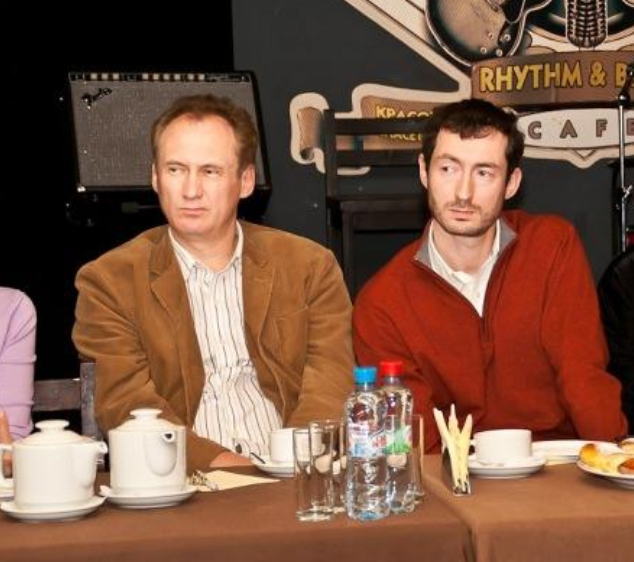
The Lubarsky brothers Dmitry or “Dan” (left) and Gary/Igor.

KrebsOnSecurity doubled down and showed how the Lubarsky brothers built and operated Radaris and other data broker companies using a fictitious CEO’s name. Our follow-up story noted that Radaris’s attorney — a lawyer with the Boston Law Group named Val Gurvits — admitted his clients had invented the CEO pseudonym “Gary Norden,” and that Radaris also had issued multiple press releases over the years that quoted the fake CEO while seeking money from potential investors.

Attorneys for Radaris waited until the last minute to appear in court and contest what was all but certain to be a default judgment in favor of the plaintiffs, and then told the court that Atlas had failed to serve the real owners and operators of Radaris and several of its sister data broker companies.

Atlas re-filed the lawsuit in June 2025, this time dramatically expanding the number of Radaris family data brokers accused of violating Daniel’s Law. Matt Adkisson, president and CEO of Atlas, said Radaris turned to a tried-and-true playbook: Delaying in court until the last possible minute, and playing shell games with Radaris’s true country of origin and the individuals listed as owners and operators of these sites.

“We refer to this period as their island-hopping phase. Privacy policies changed constantly, and new entities kept appearing from places like the Marshall Islands, the British Virgin Islands, and Seychelles,” Adkisson told KrebsOnSecurity. “Behind the scenes, it felt like a shell game. Defense lawyers told the court that certain entities merely operated the domains and were the proper parties to sue. But by the time a judgment neared, those entities would be discarded and new entities would appear. Meanwhile, the lawyers claimed the other entities that actually owned the domains should not be held responsible.”

Adkisson said when the defendants updated their terms of service to state that Radaris was suddenly managed by a company in the Marshall Islands, Atlas hired an investigator in that country and soon learned the brand new entity that Radaris claimed was managing the company didn’t even exist yet.

Mr. Gurvits stepped forward as Radaris’s attorney in a class action lawsuit the company temporarily lost in 2017 because it never contested the claim in court. When the plaintiffs told the judge they couldn’t collect on the $7.5 million default judgment, the court ordered the domain registry Verisign to transfer the radaris.com domain name to the plaintiffs.

Mr. Gurvits appealed that verdict, arguing the lawsuit hadn’t named the actual owners of the Radaris domain name — a Cyprus company called Bitseller Expert Limited — and thus taking the domain away would be a violation of their due process rights.

The judge in the 2017 case ruled in Radaris’ favor — halting the domain transfer — and told the plaintiffs they could refile their complaint. Soon after, the operator of Radaris changed from Bitseller to Andtop Company, an entity formed (PDF) in the Marshall Islands in Oct. 2020. The plaintiffs never re-filed their lawsuit.

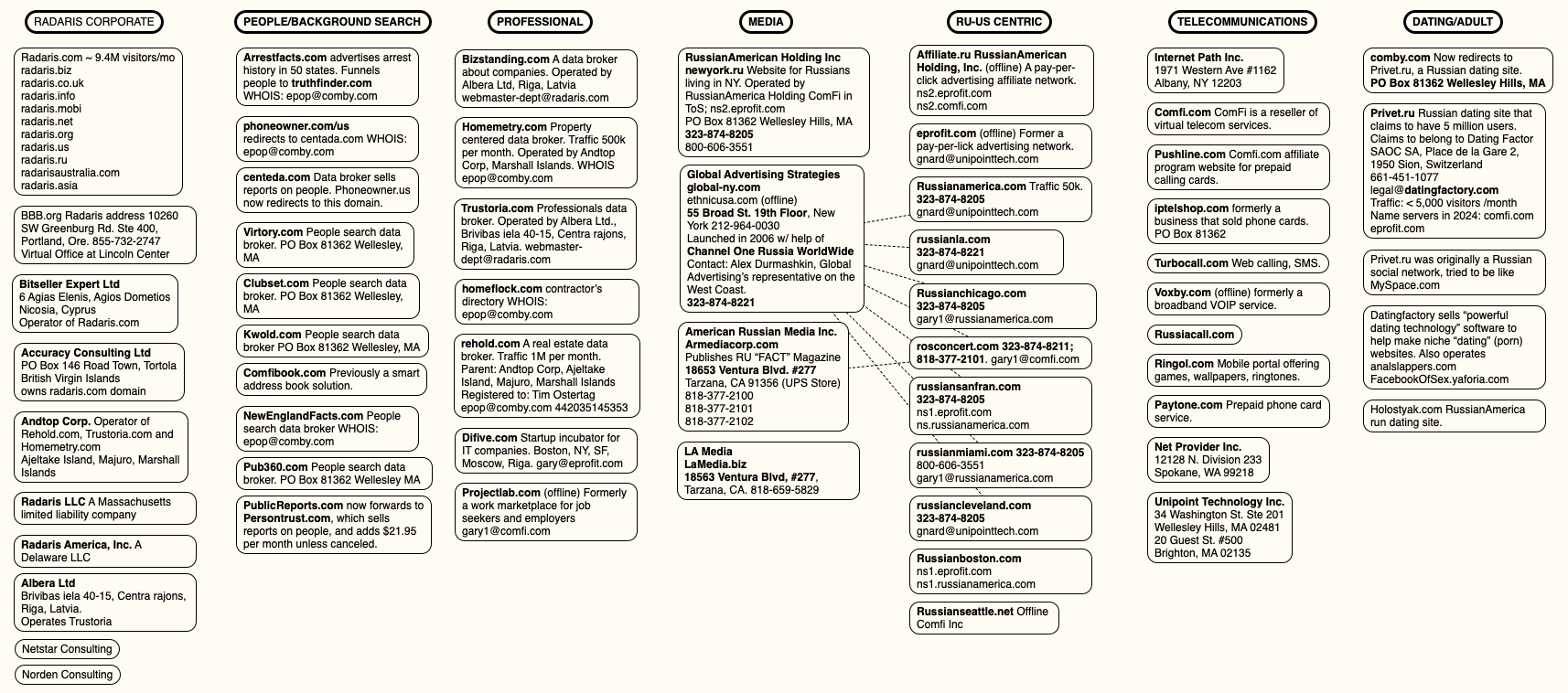
A mind map of various entities tied to Radaris and the company’s co-founders. Click to enlarge.

“That seemed to be their modus operandi,” said Raj Parikh, a partner at PEM Law in New Jersey who handles most of the Daniel’s Law litigation for Atlas. “In the past, they won by attrition. Plaintiffs’ attorneys tired of the procedural games and just gave up. That strategy worked for a decade, and it probably would have worked in this case too, since any financial recovery from foreign actors will be difficult. But we were acutely aware of the threat this website posed to law enforcement officers and other public officials in New Jersey, and decided early on to commit whatever time and resources were necessary to remove that threat.”

On August 26, the judge in the New Jersey case found the defendants were given multiple chances to appear and defend the claims against them but had failed to do so. Mr. Gurvits declined to comment on the case, saying it had been assigned to another attorney, a Mr. Victor Worms. In response to questions, Mr. Worms asserted the New Jersey court transferred Radaris.com to Atlas as part of a default judgment against Radaris.com, which is not a legal entity.

“We have made a motion to vacate that default judgment on the grounds that it is void since a non-entity has no legal capacity to sue or be sued,” Worms replied. “We also intend to pursue all appropriate appeals because we believe the transfer of Radaris.com amounts to a forfeiture in violation of various constitutional principles.”

While radaris.com still comes up prominently in results when searching online for U.S. residents by name, the domain no longer sells detailed personal dossiers on millions of Americans. Its homepage now displays a notice from Atlas, as well as links to our previous reporting on Radaris.

EMAIL CONFIRMATIONS

Atlas told KrebsOnSecurity that it has obtained more than 10,000 emails and documents in the course of litigation, and that those messages confirm our previous reporting on the owners and operators of Radaris and its myriad companies.

Atlas said the emails clearly establish that the nominal legal vehicles — Radaris America, Inc.; Bitseller Expert Limited; Digital Orbit Corp; Core Solutions Group Inc; Lucky Solutions Inc; Virtura Corp; Veripages Inc.; Nuform Solutions Inc.; Growth Data Advisors Inc.; Property Experts, Inc — are all administered by the same three or four people from the same mailboxes, share one bank or payment card set, and are all managed from one virtual office address.

“The corpus establishes, with documentary evidence generated independently by banks, payment processors, hosting providers, registrars, software-as-a-service vendors and the operators’ own systems, that radaris.com and at least twenty-five other people-search websites are one operation run by a small Boston-area group whose administrative, financial and technical functions sit on the difive.com mail domain and its successors (centerex.com, scienteco.com, eprofit.com, realmo.com, pub360.com),” reads a summary shared by Atlas.

Atlas said the emails show Radaris.com earns approximately $42,000 a month, while Veripages.com earns around $45,000 monthly via its partnership with the Lifetime Value Company, a marketing and advertising firm whose brands include PeopleLooker, PeopleSmart, NumberGuru, and Bumper, a car history site.

According to Atlas, the emails also showed the Radaris family of websites earns as much as $25,000 each month from their partnership with Onerep, a company that claims to help people remove their information from people-search sites. In March 2024, KrebsOnSecurity revealed how the Belarusian founder of Onerep had launched and operated dozens of people-search sites over the years and was continuing to operate one of them (Nuwber), effectively spreading the disease and selling the cure.

The domain radaris.com now redirects to this notice from Atlas about the court-ordered domain transfer.

The domain radaris.com now redirects to this notice from Atlas about the court-ordered domain transfer.

All told, the New Jersey court has so far transferred 14 domain names from the Radaris family of companies to Atlas. Radaris.com now redirects to a notice of the court-ordered domain transfer.

THE ROAD AHEAD

The Radaris family of companies is still potentially facing fines of $1,000 per alleged violation of Daniel’s Law. For the time being, however, Daniel’s Law is facing a constitutional challenge from virtually all of the 150 other consumer data broker firms being sued by Atlas.

The data broker industry responded by having at least 70 of the Atlas lawsuits moved to federal court, challenging the New Jersey statute as overly broad and a violation of the First Amendment. The U.S. Court of Appeals for the Third Circuit has not yet issued a decision on the constitutional challenge, but either way the case is widely expected to be appealed all the way to the U.S. Supreme Court.

Meanwhile, at least 14 other states have now passed laws modeled after the New Jersey statute, with more states considering similar measures. However, West Virginia’s Daniel’s Law was ruled facially unconstitutional under the First Amendment by a federal district court in August 2025.

Justin Sherman is a privacy expert and author of the forthcoming book “The Middlemen,” which examines how the data broker industry powers modern surveillance. Sherman said federal lawmakers have long faced intense lobbying by the technology industry against more restrictive U.S. data privacy laws, but that many powerful industries are now working against passing comprehensive data privacy legislation.

“These days at the federal level, add in the intense amount of lobbying against these laws from social media companies, big tech, cryptocurrency firms, and now AI proponents in the mix who claim that limiting their data scraping is somehow going to collapse the whole U.S. economy under Chinese rule,” he said.

Sherman said people-search companies will continue to thrive unless and until Congress enacts meaningful consumer privacy and data protection laws that are relevant to life in the 21st century. That’s because virtually all state privacy laws exempt records that might be considered “public” or “government” documents, including voting registries, property filings, marriage certificates, motor vehicle records, criminal records, court documents, death records, professional licenses, bankruptcy filings, and more.

At least 25 states have passed or implemented laws requiring age verification for residents seeking to access adult content online, but there is no federal law that limits how the companies that are scanning everyone’s drivers license can use, share or keep the data provided. Had such restrictions been enshrined in law, we may have avoided the recent breach at IDScan.net, which exposed the drivers license information on more than 153 million Americans when the records were briefly turned into a point-and-click identity theft service on the dark web.

“The average person can look at Daniel’s Law and have a perfectly normal reaction, which is that everyone should be covered, not just police and judges,” Sherman said. “But we don’t need more wake-up calls. We’ve had eight million wake-up calls already on the need for better privacy laws. The lack of comprehensive federal privacy law is not for a lack of knowledge, and anyone claiming otherwise is either not reading the news or kidding themselves.”

Read the whole story
jhunorss
6 days ago
reply
Share this story
Delete
Next Page of Stories